TL;DR:
- SEO for new websites involves establishing technical foundations, targeting long-tail keywords, and creating structured content to enhance search engine visibility from launch. Building quality backlinks and maintaining ongoing technical audits are essential to sustain rankings as algorithms evolve. Consistent effort, strategic planning, and proper site architecture significantly improve organic growth and AI recognition over time.
SEO for new websites is the process of making your site visible to search engines and the people searching for what you offer. It covers everything from technical setup and keyword research to content creation and earning links from other sites. Get these foundations right from day one, and you give your site the best possible chance of ranking before competitors get a head start.
Table of Contents
- Key Takeaways
- What is SEO for new websites and why it starts at launch
- Building your technical SEO foundation
- Keyword research and content strategy for new sites
- On-page optimization and site architecture
- Building off-page authority and maintaining your SEO
- My honest take on SEO for new websites
- How Stellor helps new websites grow faster
- FAQ
Key Takeaways
| Point | Details |
|---|---|
| Technical setup comes first | Verify your site in Google Search Console and submit your sitemap before promoting anywhere else. |
| Target long-tail keywords early | New sites lack authority, so low-competition, specific queries are far more winnable than broad terms. |
| On-page structure drives rankings | Each page needs a unique keyword, optimized title tag, and a flat site architecture for easy crawling. |
| Backlink quality beats quantity | A handful of relevant, authoritative links outperforms dozens of low-quality directory submissions. |
| SEO requires ongoing maintenance | Regular technical audits and content updates protect rankings against algorithm changes throughout 2026. |
What is SEO for new websites and why it starts at launch
SEO for new websites means building the signals that tell search engines your site is trustworthy, relevant, and worth showing to users. Most new websites receive almost no organic traffic in their first months, and the primary reason is a missing technical foundation at launch. This is not a content problem. It is a setup problem.
Think of it like the plumbing behind the walls of your digital presence. Nobody sees it, but without it, nothing flows. You can publish brilliant content, but if Google cannot crawl your pages or cannot tell what they are about, that content might as well not exist.
The importance of SEO for new sites goes beyond rankings. It determines whether real buyers find you through Google, ChatGPT, Perplexity, or any of the AI-powered answer engines that now shape how people discover businesses. Building your SEO correctly from the start means you compound results over time rather than playing catch-up eighteen months later.
Building your technical SEO foundation
Technical SEO is the part most new site owners skip, and it is the part that costs them the most. Before you write a single blog post, these setup steps should be complete.
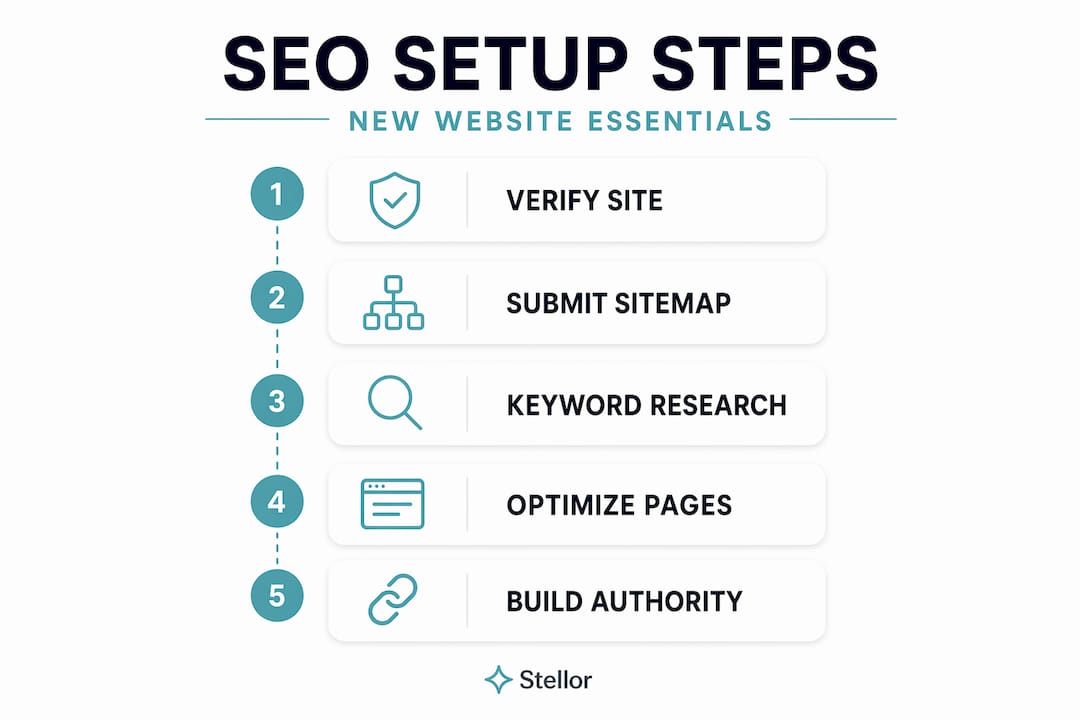
- Verify your site in Google Search Console. This is free and gives Google a direct line to communicate with you about indexing issues, manual penalties, and crawl errors. Add Bing Webmaster Tools at the same time. It takes ten minutes and ignoring it is the equivalent of opening a store without giving anyone the address.
- Submit your XML sitemap immediately. Submitting your sitemap URL after Search Console verification speeds up the discovery of your key pages. If you are on WordPress, plugins like Rank Math or Yoast auto-generate this file. Submit the URL directly inside Search Console under the Sitemaps tab.
- Check your robots.txt file. This file tells search engine crawlers which pages to visit and which to skip. A common launch mistake is accidentally blocking your entire site by carrying over staging site settings into production. Check the file at yourdomain.com/robots.txt before announcing your launch.
- Run on HTTPS. Google uses HTTPS as a ranking signal, and browsers visually warn users about non-secure sites. Your hosting provider typically provides free SSL certificates through Let’s Encrypt.
- Test mobile performance immediately. Mobile-first indexing means Google uses the mobile version of your site as the primary version for ranking and indexing. If your site loads slowly or looks broken on a phone, that directly hurts your rankings. Use Google’s PageSpeed Insights to test Core Web Vitals before going live.
Pro Tip: Install Google Analytics 4 at launch so you have baseline data from day one. You cannot improve what you never measured, and early traffic data is irreplaceable.
Keyword research and content strategy for new sites
New website SEO strategies live or die on keyword selection. The single biggest mistake new site owners make is targeting high-volume, broad keywords like “plumber” or “marketing agency” from the start. Those terms are owned by sites with years of backlinks and thousands of pages. You will not crack the top ten for them in year one.

The smarter path is long-tail, low-competition queries that match exactly what a buyer in your niche types when they are ready to act. A search like “emergency pipe repair in south Austin” or “freelance content strategist for SaaS startups” is far more winnable and often more valuable.
Here is how to build a realistic keyword plan:
- Identify search intent for every keyword. Targeting the wrong intent consistently results in poor ranking performance. Informational queries like “how does SEO work” need educational content. Transactional queries like “hire SEO consultant” need a service or landing page. Mixing these up wastes your effort.
- Build topic clusters, not isolated posts. Topic clusters build topical authority faster than individual articles because Google and AI systems favor interconnected, comprehensive content. Plan one pillar page per topic, then supporting articles that link back to it.
- Use free tools first. Google Keyword Planner, Google’s People Also Ask boxes, and Google Search Console are free and surprisingly powerful. For paid options, tools that show keyword difficulty scores help you find gaps your competitors are missing.
- Map one unique keyword per page. Every page on your site should target a single primary keyword. Splitting focus across multiple keywords on the same page dilutes your signal and confuses both users and search engines.
Content clusters with clear hierarchies help Google and AI search tools understand what your website covers as a whole. This topical authority signals to search engines that you are a credible source in your category, not just a site with random articles.
On-page optimization and site architecture
Once you have your keywords, every page needs to be properly optimized. On-page SEO for new websites covers the elements that exist directly on each page and how those pages relate to each other structurally.
| Element | What to do | Why it matters |
|---|---|---|
| Title tag | Include the primary keyword, keep it under 60 characters | This is what appears in search results and directly influences click-through rate |
| Meta description | Write a 150-character summary with your keyword and a clear benefit | Not a direct ranking factor, but improves click-through from search results |
| H1 heading | Use once per page, include the primary keyword naturally | Tells Google the main topic of the page |
| Image alt text | Describe the image using relevant keywords where natural | Helps Google understand images; improves accessibility for screen readers |
| Internal links | Link to related pages using descriptive anchor text | Distributes authority across your site and helps crawlers find all pages |
Site architecture matters more than most beginners realize. Important pages should sit within three clicks of your homepage. A flat structure keeps crawl budget from being wasted on deep, buried pages and makes it easier for users to find what they need.
Avoid keyword cannibalization by assigning each target keyword to exactly one page. If two of your pages are competing for the same keyword, Google may show the wrong one in results, or penalize both by splitting signals.
Pro Tip: Before publishing any page, read it aloud at a normal pace. If it sounds unnatural or the keyword appears too many times, thin it down. Keyword density is far less important than whether a real person would find the page useful.
For beginners building a local service site, the SEO basics for beginners concepts around page structure apply directly to every service page, location page, and FAQ you create.
Building off-page authority and maintaining your SEO
Getting your site found is one thing. Keeping it competitive as Google rolls out updates throughout 2026 is another challenge entirely.
- Start building backlinks from day one. New websites should begin building authoritative backlinks early to establish domain authority. The best early sources are industry directories, local business associations, press mentions, and genuine guest posts on relevant sites. Quality matters far more than volume. Five links from relevant, trusted sites outperform fifty links from unrelated directories.
- Set up your Google Business Profile. For local businesses, a verified and complete Google Business Profile is foundational for local citation consistency across Google, Bing Places, and niche directories. Inconsistent name, address, and phone number data across the web confuses search engines and hurts local rankings.
- Schedule monthly technical audits. SEO maintenance including technical audits and content freshness is non-negotiable in 2026 because algorithm updates now arrive frequently. Use an SEO audit checklist to catch broken links, crawl errors, and speed regressions before they cost you rankings.
- Monitor your Search Console data weekly. Search Console tells you which queries are bringing traffic, which pages are losing impressions, and whether Google has flagged any coverage issues. Check it weekly, not monthly.
- Never panic-delete content during algorithm updates. When a Google core update rolls out, resist the urge to immediately delete or rewrite large sections of your site. The Google May 2026 core update emphasizes E-E-A-T (Experience, Expertise, Authority, Trustworthiness), meaning author bios, credible sourcing, and original content matter more than ever. Fix quality issues, but do so systematically and with data, not out of fear.
Pro Tip: Set a calendar reminder every 90 days to review your top ten pages. Update outdated stats, add new examples, and refresh internal links to newer content. Pages that stay current tend to hold rankings far longer than pages left untouched.
My honest take on SEO for new websites
I have worked with dozens of new website owners over the years, and the same mistake appears again and again. People treat SEO as a launch task rather than an ongoing commitment. They spend two weeks on setup, publish ten blog posts, and then wonder why traffic has not materialized six months later.
Here is what I have found to actually work: pick three to five topic clusters that genuinely represent your expertise, and build them out before expanding. Do not try to cover everything. In my experience, a site with thirty tightly interconnected, high-quality pages almost always outranks a competitor with three hundred thin, disconnected ones.
I have also seen the site architecture issue wreck otherwise solid content efforts. A homepage that links to everything equally, with no clear hierarchy, tells Google nothing about what the site prioritizes. Structure your pages deliberately, the way you would organize a textbook, with major topics leading to supporting subtopics.
The part people underestimate most is how much AI-powered search now shapes who gets found. SEO is an ongoing process, not a one-time task, and the goalposts include both Google rankings and AI citations now. If ChatGPT or Perplexity is recommending businesses in your category, you want to be in that conversation. That requires consistent content, strong technical signals, and a real backlink profile. None of those happen overnight, but all of them compound faster than most people expect once the work starts.
— Cole
How Stellor helps new websites grow faster
New websites face a steep climb: build technical credibility, publish consistent content, earn backlinks, and show up across both Google and AI answer engines, all at once. Most businesses try to piece this together using five or more separate tools, and they end up with gaps in execution and blind spots in reporting.
Stellor replaces that patchwork with one platform built for exactly this challenge. It publishes 30 SEO and GEO-optimized articles to your site every month, runs weekly technical audits with one-click fixes, and connects your site to a 4,000-site backlink network. It also tracks your visibility across ChatGPT, Claude, Perplexity, and Gemini every week, so you always know where you stand in AI-generated recommendations. For new websites that want to rank on Google and get cited by AI at the same time, the platform is built specifically for that goal. Start with a 3-day free trial, no credit card required.
FAQ
What does SEO mean for a new website?
SEO for a new website means setting up the technical, content, and authority signals that allow search engines to find, understand, and rank your pages. It starts with technical setup like sitemap submission and HTTPS, then moves into keyword-targeted content and backlink building.
How long does SEO take to show results for a new site?
Most new websites begin seeing meaningful organic traffic between three and six months after launch, provided the technical foundation is correct and content is published consistently. Competitive niches may take longer.
What are the most important SEO steps at website launch?
The most critical launch steps are verifying your site in Google Search Console, submitting your XML sitemap, confirming robots.txt is not blocking important pages, and checking that your site loads correctly on mobile devices.
Why should new websites target long-tail keywords?
New sites lack the domain authority needed to compete for broad, high-volume terms. Long-tail keywords with lower competition are more realistically winnable early on, and they often attract visitors who are closer to making a decision.
How does on-page SEO differ from off-page SEO?
On-page SEO refers to the content and structure elements you control directly on your site, such as title tags, headings, and internal links. Off-page SEO refers to external signals like backlinks and local citations that build your site’s authority in the eyes of search engines.