TL;DR:
- Asking customers for Google reviews within 24 to 48 hours yields the highest response rates. Automating personalized requests through verified profiles and direct links ensures consistent, compliant review collection. Responding promptly to reviews builds trust and improves your local SEO standing.
Getting reviews on Google is a direct process: ask every customer within 24–48 hours of service using your Google Business Profile review link, and 70–80% will respond when asked directly. Without a prompt, fewer than 10% of satisfied customers leave a review on their own. That gap is the entire opportunity. This guide covers the tools, timing, phrasing, and compliance rules you need to build a consistent review flow without risking your Google Business Profile.
How to get reviews on Google: tools and setup
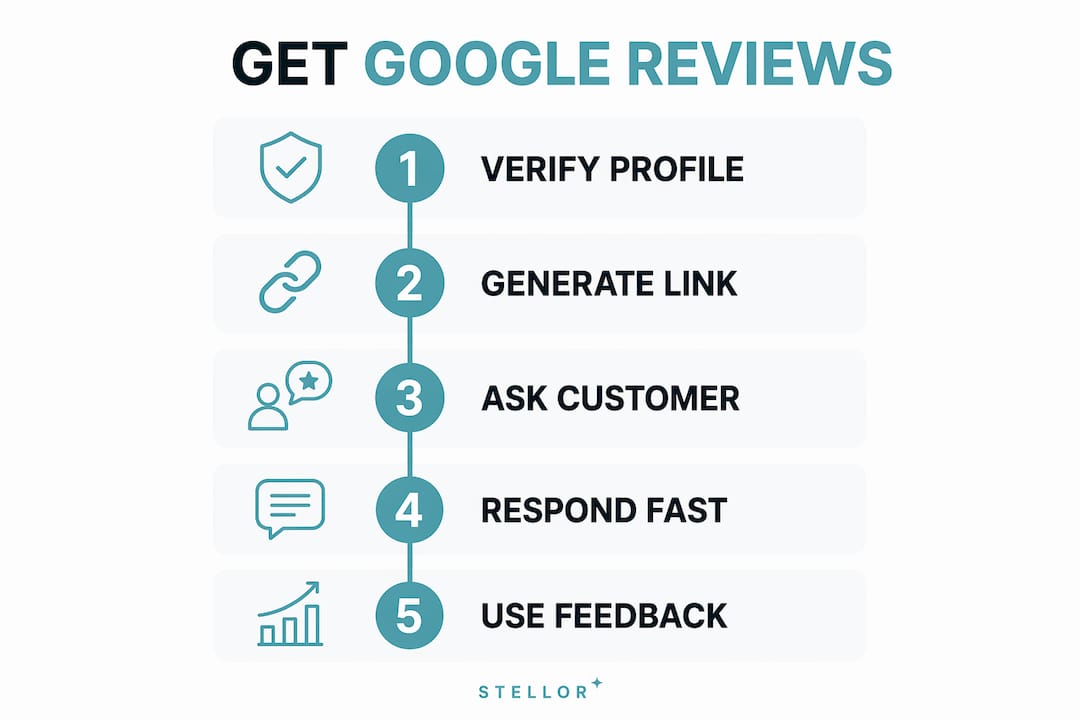
Before you send a single request, your Google Business Profile must be fully verified and complete. An incomplete profile, missing hours, no photos, or an unclaimed listing, signals low credibility and reduces the chance a customer will trust the review form they land on. Verification through Google is the non-negotiable first step.
Once verified, generate your direct review link. Inside the Google Business Profile dashboard, the “Ask for reviews” button produces a short URL that opens directly to the star-rating box. That matters because removing friction is the single biggest conversion lever in review collection. A customer who has to search for your business, find the reviews tab, and then click “Write a review” will abandon the process at a much higher rate than one who lands directly on the form.
From that link, you can create a QR code using any free generator such as QR Code Generator or Canva. Print it on receipts, service completion cards, and waiting room signage. Embed the raw link in your CRM email templates and SMS workflows. The goal is to make the path from “happy customer” to “published review” as short as possible.
Pro Tip: Use a branded URL shortener like Bitly to wrap your Google review link. A URL like bit.ly/YourBusinessReview looks far more trustworthy in a text message than a raw Google URL string.
| Tool | Primary use | Cost |
|---|---|---|
| Google Business Profile | Generate review link, manage profile | Free |
| Bitly or Rebrandly | Shorten and brand the review URL | Free tier available |
| QR Code Generator or Canva | Create printable QR codes | Free |
| HubSpot, Jobber, or ServiceTitan | CRM triggers for automated follow-up | Paid |
| Twilio or similar SMS platform | Automated SMS delivery | Usage-based |
Your Google Business Profile setup is the foundation every other tactic depends on. Get it right before you build any request workflow on top of it.
When and how to ask customers for reviews
Timing is the variable most local businesses get wrong. The ideal window is 24–48 hours after a service is completed or a purchase is made. At that point, the experience is fresh, the customer is satisfied, and they have not yet moved on mentally. Waiting a week drops response rates sharply.

The phrasing of your in-person ask matters more than most owners realize. Ask for “feedback on their experience” rather than explicitly asking for a “Google review.” This approach avoids triggering solicitation concerns and feels more natural in conversation. Then follow up immediately with the direct link via SMS or email. The verbal ask creates the intent; the link removes the friction.
Automation is what makes this consistent. A CRM trigger that fires when a job is marked “complete” in tools like Jobber or ServiceTitan sends the request without anyone on your team having to remember. Per-customer automated requests are explicitly allowed by Google and are more effective than batch campaigns sent to a list. The 30-day review playbook for home service businesses shows how to build this trigger sequence step by step.
Use multiple channels to reach customers where they are most responsive:
- SMS: Highest open rates. Send within 24 hours. Keep the message under 160 characters with the direct link.
- Email: Best for customers who prefer written communication. Include the review link as a button, not plain text.
- Printed receipt or service card: Effective for walk-in businesses. QR code on the bottom of the receipt is the simplest implementation.
- In-person verbal ask: Most powerful when done warmly and without pressure. Pair it with the digital follow-up.
Framing your request around community benefit increases response rates. Telling a customer that their feedback “helps neighbors find a trustworthy service” taps altruism rather than transactional pressure. That framing consistently outperforms “please leave us a review.”
Pro Tip: Respond to every new review within 24 hours. Customers who see that you engage publicly are more likely to leave their own review, because they know it will be read.
What mistakes can get your Google profile penalized?
The most common and damaging mistake is offering an incentive for a review. Google explicitly prohibits discounts, free products, gift cards, or any other reward in exchange for a review. Violations can result in review removal or full profile suspension. The rule applies even when the incentive is offered after the review is posted.
Review gating is the second major violation. Review gating means filtering customers based on their expected satisfaction before sending a review request. Sending the link only to customers you believe are happy, while skipping unhappy ones, violates both Google’s Terms of Service and FTC guidelines. Both Google and the FTC require that review solicitations be sent universally and neutrally.
Send identical, neutral requests to all customers and keep a digital record of every request sent. That audit trail protects you if Google ever questions your review acquisition practices. A simple spreadsheet logging the date, customer, and channel is sufficient.
Common pitfalls to avoid:
- Asking only for 5-star reviews. Your request must not specify a rating. “Share your honest experience” is compliant. “Leave us a 5-star review” is not.
- Buying reviews. Fake reviews are detectable by Google’s systems and result in removal and penalties.
- Asking employees or friends to post reviews. Google’s systems flag unusual review patterns, including clusters of reviews from the same IP address or location.
- Deleting negative reviews. You cannot remove a review unless it violates Google’s content policies. Attempting to suppress legitimate feedback is a terms violation.
- Sending bulk campaigns to old customer lists. A sudden spike in reviews from a batch email triggers Google’s fraud detection. Per-customer, triggered requests are safer and more effective.
For home service businesses, understanding review solicitation rules in your specific industry adds another layer of protection, particularly in regulated trades.
How should you respond to Google reviews?
Responding to every review, positive and negative, is a direct signal to both customers and Google that your business is active and accountable. Responding calmly and professionally to negative reviews builds more trust with prospective customers than a perfect star rating does. A business with a 4.3 rating and thoughtful responses to criticism looks more credible than one with 5.0 stars and no engagement.
For positive reviews, acknowledge the specific detail the customer mentioned. “Thank you for mentioning our technician Marcus” reads as genuine. “Thanks for the great review!” reads as a template. Specificity signals that a real person read the feedback.
For negative reviews, respond within 24 hours. Acknowledge the issue without being defensive. Offer a direct path to resolution, such as a phone number or email address. Never argue publicly. The goal is not to win the argument. The goal is to show every future reader that you take problems seriously.
Review responses also affect your local SEO performance. Google’s algorithm factors in review activity, including response rate, as part of local map pack rankings. A business that responds consistently signals relevance and engagement.
Pro Tip: Set up Google Business Profile notifications so you receive an alert the moment a new review is posted. Immediate awareness is the only way to consistently hit the 24-hour response window.
Use patterns in your reviews to improve your service. If three customers in a month mention long wait times, that is operational data, not just feedback. Treating reviews as a quality signal rather than a vanity metric is what separates businesses that grow from those that stagnate.
Key takeaways
The most effective way to increase Google reviews is to ask every customer within 24–48 hours using a direct review link, automate the request through your CRM, and respond to every review publicly within 24 hours.
| Point | Details |
|---|---|
| Ask within 24–48 hours | Timing is the biggest factor in response rate; fresh experiences convert at the highest rate. |
| Use a direct review link | The Google Business Profile “Ask for reviews” link opens the star-rating box immediately, removing friction. |
| Automate per-customer requests | CRM triggers send consistent, policy-compliant requests without relying on staff memory. |
| Never incentivize or gate | Offering rewards or filtering unhappy customers violates Google’s Terms of Service and FTC rules. |
| Respond to every review | Public responses build trust with future customers and signal engagement to Google’s local algorithm. |
What I’ve learned about building a review system that actually lasts
The businesses I see struggle most with Google reviews are the ones treating it as a one-time campaign. They send a batch email to their customer list, get a short spike, and then wonder why the reviews stop. That approach also carries real compliance risk. A sudden cluster of reviews from a bulk send is exactly what Google’s fraud detection looks for.
The businesses that build durable review volume do one thing differently: they make the request automatic and universal. Every completed job triggers a message. Every customer gets the same neutral ask. No filtering, no incentives, no exceptions. That consistency compounds over months. It also creates a clean audit trail if Google ever scrutinizes the account.
The framing shift toward community benefit is something I find genuinely underused. Telling a customer that their review helps their neighbors make a better decision is both true and more motivating than asking them to do you a favor. Altruism converts better than obligation.
The temptation to shortcut this process, buying reviews, gating unhappy customers, or offering discounts, is real when you are busy running a business. But the downside is not just a slap on the wrist. A suspended Google Business Profile can erase years of local search visibility overnight. The compliant path is also the durable one.
— Cole
How Trystellor helps local businesses grow their review presence
Building a consistent review request workflow takes the right tools and the right content strategy working together. Trystellor is a GEO + SEO platform built for local businesses that need both. It publishes 30 optimized articles per month to your site, runs weekly technical audits, and tracks your visibility across Google, ChatGPT, Perplexity, Claude, and Gemini. The platform’s content engine produces the local SEO content that makes your business the credible, citable choice when buyers search. Trystellor starts at $199 per month with a three-day free trial and no credit card required. Explore the full platform features to see how it fits your review and visibility goals.
FAQ
How many customers will leave a review if asked directly?
Research shows 70–80% of customers will leave a review when asked directly, compared to fewer than 10% who do so without a prompt.
Can I offer a discount in exchange for a Google review?
No. Google’s review policy explicitly prohibits incentives of any kind, including discounts, free products, or gift cards, in exchange for reviews.
What is review gating and why is it against the rules?
Review gating means sending review requests only to customers you expect will rate you positively. Both Google and the FTC prohibit this practice because it artificially skews ratings and misleads consumers.
How should I respond to a negative Google review?
Respond within 24 hours, acknowledge the issue calmly, and offer a direct path to resolution such as a phone number or email. Transparent responses to criticism build more trust with prospective customers than ignoring the review does.
Is it better to send review requests manually or through automation?
Automation is more effective and more compliant. Per-customer automated requests triggered after service completion are explicitly allowed by Google and produce more consistent results than manual or batch outreach.