TL;DR:
- A Google Business Profile is a free tool that allows local businesses to control their appearance on Google Search and Maps, increasing visibility and customer engagement. Regular updates, complete information, and active management significantly improve search rankings and attract more customer interactions. Most businesses neglect ongoing optimization, leaving valuable local search opportunities untapped and revenue on the table.
A Google Business Profile is defined as Google’s free tool that lets local businesses control how their listing appears across Google Search and Google Maps. It displays your business name, address, phone number, hours, photos, reviews, and services directly in search results, so customers can call, get directions, or book an appointment without ever visiting your website. For any local business competing for attention in 2026, this profile is the single most visible piece of real estate you own on the internet.
What is Google Business Profile and why it matters for local search
A Google Business Profile, formerly known as Google My Business, is the structured listing Google uses to populate its local pack, Maps results, and Knowledge Panel. When someone searches “plumber near me” or “best Italian restaurant in Denver,” Google pulls from these profiles to decide which businesses to show, in what order, and with what details. The profile is the plumbing behind the walls of your local search presence.
Regular updates and accurate info can increase profile views by up to 500%. That number reflects a simple truth: Google rewards businesses that treat their profile as a living asset, not a one-time form submission.

The profile also drives direct customer actions. Profiles facilitate immediate action from local customers without requiring a website visit. A potential customer searching on their phone can call you, get directions, or book a service in two taps. That frictionless path from search to contact is a Google Business Profile benefit no paid ad can fully replicate.
Google has also simplified how you manage the profile. Businesses can claim and edit profiles via Search and Maps directly, without a separate app. Search your business name while logged into your Google account, and the management interface appears inline. This shift makes it faster to catch errors and push updates in real time.
What key features and information are included in a profile?
A fully built-out Google Business Profile contains far more than a name and address. Understanding every available field helps you present your business completely and gives Google more data to match you to relevant searches.
The core information fields include:
- Business name (must match your real-world signage exactly)
- Address or service area (choose service area if you travel to customers)
- Phone number and website URL
- Primary and secondary categories (what Google uses to classify your business)
- Operating hours, including holiday hours and special hours
- Business description (750 characters to explain what you do and why customers choose you)
- Services and products with individual descriptions and prices
- Appointment or booking links connected directly to your scheduling system
- Photos and videos of your location, team, and work
- Customer reviews and your public responses
- Q&A section where customers ask questions and you provide answers
- Posts and updates for promotions, events, and announcements
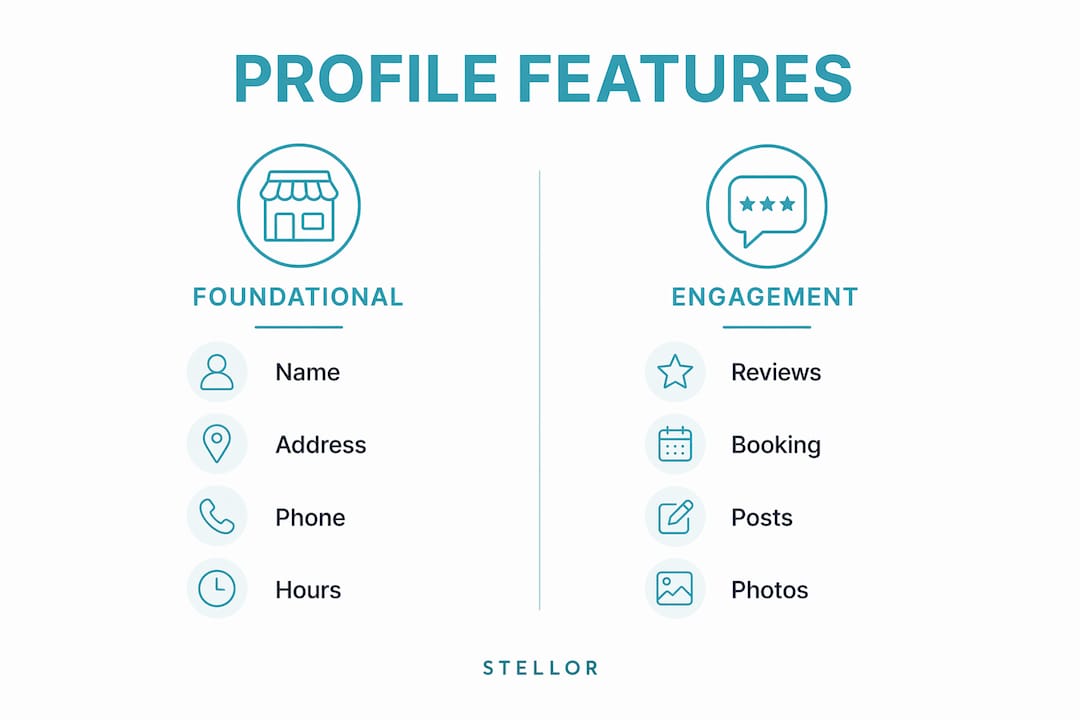
The table below shows how these features divide between foundational information and active engagement tools.
| Feature type | Examples | Primary purpose |
|---|---|---|
| Foundational info | Name, address, phone, hours, categories | Helps Google match you to searches |
| Visual content | Photos, videos, virtual tours | Builds trust and increases click-through |
| Engagement tools | Reviews, Q&A, posts, booking links | Converts searchers into customers |
| Service details | Services list, products, descriptions | Signals relevance to specific queries |
Key profile features like categories and booking links directly influence Google’s algorithm and help customers take action faster. Choosing the right primary category is one of the highest-leverage decisions you make during setup. A plumber who selects “Plumber” as their primary category rather than “Contractor” will rank in far more relevant searches.
How to optimize your Google Business Profile for maximum local visibility
Google Business Profile optimization is the ongoing process of completing, updating, and actively managing your profile so Google ranks it higher and customers engage with it more. The following steps form a practical optimization checklist you can work through systematically.
-
Claim and verify your listing. Search your business name on Google and claim the profile if it already exists, or create a new one at business.google.com. Verification typically arrives by postcard, phone, or video call within a few days.
-
Complete every field without exception. Google uses completeness and consistency of NAP data (name, address, phone) to confidently match businesses to relevant local searches. Incomplete profiles rank lower because Google cannot confirm your relevance.
-
Choose your categories carefully. Your primary category carries the most algorithmic weight. Add secondary categories only when they accurately describe additional services. A dental practice might use “Dentist” as primary and “Cosmetic Dentist” or “Pediatric Dentist” as secondary categories.
-
Add at least ten photos at launch, then add more monthly. Include exterior shots, interior shots, team photos, and images of your work. Active profiles see up to 10 times more traffic than competitors with sparse profiles. Photos signal to both Google and customers that your business is active and credible.
-
Generate and respond to every review. Ask satisfied customers to leave a review by sending them a direct link to your review form. Respond to every review, positive or negative, within 48 hours. A response to a negative review often matters more to prospective customers than the negative review itself.
-
Publish posts weekly. Use the Posts feature to share offers, announcements, and updates. Posts appear directly in your profile and signal to Google that your business is active. Think of them as mini social media updates that live inside your search result.
-
Keep hours accurate at all times. Update holiday hours before the holiday, not after. Nothing damages customer trust faster than driving to a business that Google says is open and finding it closed.
Pro Tip: Set a recurring monthly calendar reminder to audit your profile. Check every field, add at least two new photos, respond to any unanswered Q&A, and publish a fresh post. This 20-minute habit compounds into significantly better local map pack rankings over a quarter.
For service-based businesses, the local visibility tips for auto shops and similar trades apply directly to your profile setup and category selection strategy.
Common pitfalls and misconceptions about Google Business Profiles
Many local business owners set up their profile once and assume the work is done. That assumption costs them rankings, calls, and customers every single month.
“Small business owners often underestimate the Google Business Profile’s role beyond listing. It is a central hub for customer interaction and brand presence on Google.” — US Chamber of Commerce
The most damaging mistakes fall into four categories:
- Treating the profile as static. Outdated or inaccurate profiles quickly lose customer trust and search prominence. Google’s algorithm favors profiles that show recent activity.
- Ignoring NAP consistency across the web. Local SEO success depends heavily on NAP consistency. If your address on Google says “Suite 100” but your website says “Ste. 100,” Google reads those as potential mismatches and reduces its confidence in your listing.
- Skipping the review response process. Businesses that never respond to reviews signal to Google and to customers that no one is minding the store. Review velocity and response rate both factor into local ranking signals.
- Using the wrong primary category. A business that selects a broad or inaccurate category misses the specific searches where it should be winning. This is one of the most common and most fixable errors in local SEO.
The profile optimization guide for generating leads covers how to audit these issues systematically if you suspect your current profile has gaps.
Key takeaways
A fully optimized, actively managed Google Business Profile is the single most cost-effective local SEO asset available to any local business in 2026.
| Point | Details |
|---|---|
| Free and high-impact | Google Business Profile costs nothing and directly drives calls, visits, and directions from search results. |
| Completeness drives rankings | Every unfilled field is a missed signal. Complete all fields, including categories, services, and hours. |
| Activity beats static setup | Regular photos, posts, and review responses produce up to 10x more traffic than inactive profiles. |
| NAP consistency is non-negotiable | Mismatched name, address, or phone data across Google and your website reduces local pack visibility. |
| Categories determine relevance | Your primary category is the strongest signal Google uses to match your business to specific searches. |
Why I think most local businesses are leaving serious money on the table
I have reviewed hundreds of Google Business Profiles for local service businesses, and the pattern is almost always the same. The profile was set up during a slow week two or three years ago, the owner added the basics, and then life got busy. The photos are from a phone that has since been replaced. The hours were never updated after a schedule change. There are 14 unanswered reviews sitting there, including two one-star complaints that any prospective customer will read before deciding whether to call.
Here is what that looks like from the customer’s side. They search for a service, they see your profile alongside two competitors, and they make a split-second judgment based on photos, ratings, and whether the business looks alive. A profile with 47 reviews, a response to every one of them, fresh photos from last month, and a post from last week wins that judgment call almost every time. The competitor with 12 reviews and a photo of an empty parking lot from 2022 does not.
The part that surprises most owners when I tell them is that Google itself is watching the same signals. An active profile with recent posts, new photos, and consistent hours tells Google’s algorithm that this business is operating and engaged. Google wants to send searchers to businesses that will actually serve them well. Show Google you are that business, and it will show you to more searchers.
The local SEO basics guide for 2026 is a good starting point if you want to understand how the profile fits into the broader picture of local search. But the profile itself is where most businesses should start, because the gains are fast and the cost is zero.
— Cole
How Trystellor helps you stay ahead in local search
Managing a Google Business Profile well takes consistent attention, and most business owners are already stretched thin. Trystellor is a GEO and SEO platform built to handle the ongoing work of local search visibility automatically. It publishes 30 optimized articles per month to your site, runs weekly technical audits, tracks your citations across ChatGPT, Claude, Perplexity, and Gemini, and surfaces daily opportunities to build your presence where buyers are actually searching.
For local businesses that want to rank on Google and get recommended by AI without managing five separate tools, Trystellor consolidates everything into one platform starting at $199 per month. The full product overview shows exactly what is included. A three-day free trial requires no credit card, and you keep all content produced even if you cancel.
FAQ
What is a Google Business Profile?
A Google Business Profile is Google’s free tool for managing how your business appears in Google Search and Google Maps. It displays your contact details, hours, photos, reviews, and services directly in search results.
How do I create a Google Business listing?
Search your business name on Google while signed into your Google account, then select “Add your business to Google.” You can also go to business.google.com to start the process and complete verification by postcard, phone, or video.
What are Google Business Profile categories?
Google Business Profile categories classify your business type so Google can match you to relevant searches. Your primary category carries the most weight, so choose the one that most precisely describes your core service.
How does Google Business Profile optimization improve rankings?
Optimization means completing every profile field, adding regular photos, publishing posts, and responding to reviews. Google rewards complete, active profiles with higher placement in the local pack and Maps results.
Can I manage my Google Business Profile without the Google My Business app?
Yes. Google shifted profile management directly into Search and Maps. Search your business name while logged into your Google account and manage all fields inline, without downloading a separate application.