

You can track calls from SEO without hurting rankings, as long as you keep your canonical business number in the site’s HTML and use Dynamic Number Insertion (DNI) for the numbers visitors actually see. That combination lets you attribute calls to organic sessions, landing pages, and even keywords, while search engines still read one consistent phone number. Run a quick audit of where your number appears across your site and directory listings before you touch anything, then layer tracking into GA4 and your CRM for closed-loop reporting.
TL;DR:
- Keep your canonical business number unchanged in all site source code and directory listings to prevent NAP inconsistencies that can harm local SEO.
- Use Dynamic Number Insertion solely for display purposes, ensuring it swaps numbers via JavaScript after page load without altering the site’s HTML source for crawling.
- Allocate enough tracking numbers based on traffic volume; under-allocating can cause attribution errors and pool exhaustion, affecting data accuracy.
- Regularly audit your HTML, schema markup, and citations quarterly to confirm the canonical number remains consistent and avoid SEO penalties.
- Avoid embedding tracking numbers directly into website code or schema, which can lead to indexing issues and ranking drops.
Table of Contents
- How Does Call Tracking For SEO Actually Work?
- Why Does NAP Consistency Matter For Local SEO?
- How Do You Set Up SEO Call Tracking Step By Step?
- What Should You Push Into Analytics And CRM Reporting?
- How Many Tracking Numbers Do You Actually Need?
- When Does Call Tracking Actually Hurt SEO?
- What A GEO + SEO Operator Sees In Call Data
- What The Data Actually Tells You To Prioritize
- A Managed Alternative If You’d Rather Not Run This Yourself
- Sources
- FAQ
How Does Call Tracking For SEO Actually Work?
Dynamic Number Insertion swaps the phone number a visitor sees based on how they arrived at your site. It runs entirely in JavaScript, so the number baked into your HTML source never changes. Here’s the sequence:
- A visitor lands on your site from an organic search result, a paid ad, or a direct link.
- JavaScript detects the traffic source and session data, then swaps the displayed number for a tracking number tied to that source.
- The tracking number routes the call to your real business line, invisibly to the caller.
- The call tracking platform logs the landing page, session length, general location, and keyword when it’s available.
That’s it. Nothing about your site’s crawlable content changes. Google’s crawlers see the same static number in your page source every time, because Dynamic Number Insertion done right leaves canonical numbers untouched and only alters what a browser renders on the fly.
Most businesses run three variants side by side: DNI on the website itself, a dedicated number on your Google Business Profile, and forwarding rules that route calls from directory listings, similar to what WasherAuthority offers for pressure washers. Each variant answers a different question. DNI tells you which pages and keywords drive calls. A dedicated GBP number tells you whether the call came from your Business Profile or your website. Forwarding rules keep the caller experience seamless no matter which number they dial.
Why Does NAP Consistency Matter For Local SEO?
NAP stands for Name, Address, Phone number. Search engines cross-reference your NAP across your website, Google Business Profile, and directory citations like Yelp or Angi to confirm you’re a real, stable business. When those details match everywhere, local search algorithms trust the listing more. When they don’t, your local map pack rankings can slip.
The mistake that trips up businesses new to call tracking is publishing a tracking number where it gets indexed or scraped, rather than keeping it purely on the visitor-facing display layer. Once a tracking number ends up baked into your site’s raw HTML, cached in a directory citation, or embedded in schema markup, you’ve created a mismatch that confuses the exact signal you’re trying to protect.
The fix is a strict rule, not a judgment call:
- Keep your one canonical phone number in the site’s HTML, in your schema markup, and in every directory listing.
- Use DNI purely as a display layer swap that JavaScript renders after the page loads.
- Never hard-code a tracking number into a citation, footer, or contact page copy.
This is the exact pattern that protects NAP consistency while still capturing attribution data.
How Do You Set Up SEO Call Tracking Step By Step?
Getting this right the first time saves you months of messy data later. Here’s the sequence that works for most small and mid-sized service businesses:
- Install DNI through a JavaScript snippet or your CMS’s call tracking plugin, and confirm your canonical number stays untouched in the source HTML.
- Separate GBP from organic traffic. Add UTM parameters to the links on your Google Business Profile, or assign GBP a dedicated tracking number, so a call from your profile doesn’t get lumped in with a call from your homepage.
- Configure a GA4 event for phone calls that passes source, medium, landing page, and call duration, then mark that event as a conversion.
- Forward every tracking number to your main business line so the caller never notices a difference.
- Set a call-duration threshold, typically 60 to 90 seconds, before counting a call as a real conversion rather than a hang-up or wrong number. Enable call recording or quality scoring only where local law permits it.
Pro Tip: Test your DNI setup in an incognito window from three different traffic sources (a Google search, a direct URL, and a GBP click) before you trust a single report. If all three show the same number, your swap script isn’t firing.
If you run a service business with recurring landing pages, a tool like Stellor’s real-time SEO tracking can help confirm which pages are actually generating the calls once DNI is live.
What Should You Push Into Analytics And CRM Reporting?
Raw call logs are useless until they’re connected to the rest of your funnel. Every call event should carry these fields into GA4 and your CRM:
- Source and medium (organic, GBP, paid, referral)
- Landing page and utm_campaign, if one exists
- Call duration and general caller location
- Outcome or lead quality, tagged by your sales team
Mark the call event as a GA4 conversion and put it on the same dashboard as organic sessions and form fills, so calls stop living in a silo separate from the rest of your SEO reporting. From there, feed outcomes back into your CRM to close the loop between a call and actual revenue, and cross-reference call volume with Search Console queries to see which keywords are driving phone leads instead of just clicks.
For many service businesses, phone calls make up 30 to 50% of total conversions, and more than 70% for some local categories. Reporting on organic traffic without call data means you’re missing most of the picture.
One more source is worth isolating on its own: AI-driven calls. AI-driven call volume rose 58% in the first half of 2026, as tools like ChatGPT and Perplexity increasingly recommend specific businesses by name. If you don’t bucket those calls separately, they get grouped under “direct” or “other” and your SEO work looks less effective than it actually is.
How Many Tracking Numbers Do You Actually Need?
Pool size depends on traffic volume, not guesswork. Too few numbers and the same tracking number gets reused across unrelated sessions, corrupting your attribution before you even notice.
- Under 100 daily visitors: 3 to 5 numbers
- 100 to 500 daily visitors: 8 to 12 numbers
- 500 to 1,000 daily visitors: 15 to 20 numbers
Watch for pool exhaustion: if call reports start showing the same tracking number attributed to visitors from wildly different sources, your pool is too small. Run a quarterly audit that tests source swaps, verifies your UTMs still fire, checks that GA4 and CRM data are flowing, and confirms your GBP number still maps correctly. Multi-location businesses generally do better with a dedicated pool per location rather than one shared pool segmented by URL path, since it keeps attribution clean when locations run separate local campaigns.
When Does Call Tracking Actually Hurt SEO?
Nearly every horror story about call tracking wrecking rankings traces back to one of four avoidable mistakes.
- Hard-coding a tracking number into HTML or a directory listing. Fix: keep tracking numbers exclusive to the DNI JavaScript layer.
- Publishing tracking numbers where crawlers index them, including schema markup. Fix: your canonical NAP goes in visible source code and structured data, always.
- A site redesign or A/B test silently breaks the DNI script. Fix: add DNI verification to your release QA checklist every time you ship a front-end change.
- Mixing GBP and organic calls without a UTM scheme. Fix: apply a consistent UTM structure to every GBP-to-site link so the two sources never blend.
What A GEO + SEO Operator Sees In Call Data
Call attribution changes what content actually deserves investment. When a specific service page keeps generating tracked calls, that’s a signal to build more pages like it, not just more content in general. At Stellor, weekly technical audits and a 30-article monthly content cadence exist partly to catch DNI breakage fast and reinforce the pages proving their worth in call volume. Start with an audit, add DNI, connect GA4 and your CRM, then review results after 90 days.
What The Data Actually Tells You To Prioritize
Most call tracking advice buries the real lesson under a pile of feature comparisons. The lesson is simple: NAP integrity is the constraint, not the tracking technology. Any DNI provider on the market today can swap a number in JavaScript. The businesses that get burned aren’t picking the wrong platform, they’re skipping the audit that confirms their canonical number survived a site migration or a marketing team’s copy edit.
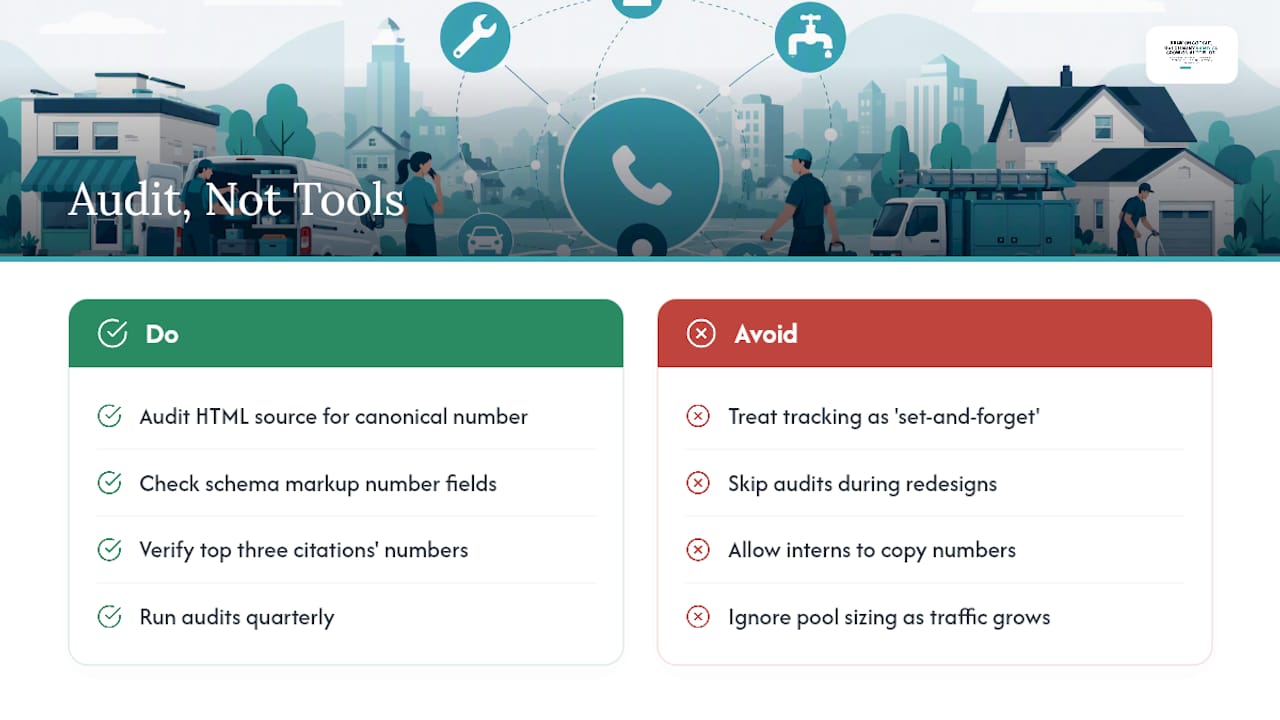
The conventional advice treats call tracking as a “set it and forget it” tool. It isn’t. Scripts break during redesigns. Interns copy tracking numbers into new directory listings because nobody told them not to. Pools run dry as traffic grows and nobody resizes them. None of that shows up until a quarter’s worth of call data is already wrong.
If you take one thing from this, make it the audit habit, not the tooling. Check your HTML source, your schema, and your top three citations for number consistency before you trust a single call report. Do that quarterly, and the actual attribution mechanics, DNI, UTMs, GA4 event mapping, stay reliable without much babysitting. Get the discipline right and the technology mostly takes care of itself.
— Cole
A Managed Alternative If You’d Rather Not Run This Yourself
Setting up DNI, sizing your number pool, connecting GA4, and running a quarterly audit is entirely doable in-house, but it’s also exactly the kind of recurring technical maintenance that falls off the priority list once you’re busy running the business. Stellor is built as an alternative to piecing together five separate SEO and tracking tools: it runs weekly technical audits that would catch a broken DNI script before it skews a month of attribution data, publishes 30 GEO and SEO-optimized articles a month to build the landing pages worth tracking in the first place, and tracks your visibility across ChatGPT, Claude, Perplexity, and Gemini so AI-driven calls stop hiding under “direct” in your reports.

If you run a multi-location home service business, the 30-day GEO playbook shows how the content and audit cadence work together in practice. Stellor starts at $199 a month with a 3-day free trial and no card required, so you can see the audit findings before committing to anything.
Sources
- AI search tracking checklist: How to attribute calls from ChatGPT, Claude, and Perplexity
- Is Call Tracking Bad for SEO? Myths vs. Reality
- Practical guide to SEO call tracking
FAQ
What Is SEO Call Tracking?
SEO call tracking is the practice of assigning trackable phone numbers to organic search visitors through Dynamic Number Insertion, then logging which landing pages, keywords, and sessions produced each call. It closes the gap between organic traffic reports and actual phone leads, which for many service businesses make up 30 to 50% of total conversions.
Is SEO Dead Now That AI Answers Questions Directly?
No. SEO has shifted, not disappeared. AI-driven calls grew 58% in the first half of 2026, which means AI tools are actively recommending businesses that rank well and have strong content, making SEO more relevant to AI visibility, not less.
Can I Track Phone Call Conversions In Google Ads?
Yes, Google Ads offers native call conversion tracking for ads using forwarding numbers or call extensions, separate from the organic SEO tracking discussed here. The two systems can run in parallel, but you’ll want distinct UTM schemes so paid and organic call data never blend together in your reports.
What Should I Watch For When Monitoring Phone Call Tracking?
If you’re checking whether your own tracking setup is working correctly, look for consistent number swaps across incognito test sessions from different traffic sources, and confirm your canonical number never appears altered in page source. Any script that changes the number in raw HTML rather than through JavaScript rendering is a sign of a broken or misconfigured DNI setup.
Does Call Tracking Violate GDPR Or CCPA?
Call tracking itself is legal, but recording calls or storing caller data triggers consent and disclosure requirements under GDPR in the EU and CCPA in California. Most platforms include compliance features like recording disclaimers and data retention controls, but you’re responsible for enabling them correctly for your jurisdiction.
How Do I Know If My Call Tracking Setup Is Hurting My Rankings?
Check three things: whether your canonical phone number appears unchanged in your site’s HTML source, whether any tracking number has leaked into a directory citation or schema markup, and whether your Google Business Profile phone number matches your website exactly. If all three check out, DNI-based tracking poses no meaningful risk to your rankings.