

Use schema.org/Service (or a closely related subtype like SoftwareApplication for SaaS) and add three fields immediately: name, provider linked by @id, and serviceType. Round that out with url and areaServed, then validate the JSON-LD with the Schema.org Validator and Google’s Rich Results Test before you publish.
TL;DR:
- Proper implementation of service schema requires adding key properties like @type, @id, name, provider, url, and serviceType, with areaServed and offers as recommended considerations.
- Using consistent @id references and avoiding duplicate organization objects ensures accurate entity linking critical for AI and search crawlers.
- Service schema is most beneficial for AI answer engines and entity grounding, rather than generating specific rich results in Google’s SERPs.
- For businesses selling software or packaged products, switching to Product or SoftwareApplication schemas offers better compatibility with Google’s rich result features.
- Regular validation, updates, and automation of schema markup prevent drift and ensure accurate AI attribution and entity recognition over time.
Table of Contents
- What Is Service Schema and Why Does It Matter for Search and AI?
- Key Service Properties and Copy-Ready JSON-LD Examples
- How Do You Implement Service JSON-LD on a Page?
- When Should You Use Product or SoftwareApplication Instead?
- Validation Pipeline and the Mistakes That Break Entity Linking
- Best-Practices Checklist for a 10-Minute Audit
- How Stellor Handles Service Schema at Scale
- Handling Updates and Versioning Over Time
- What Actually Moves the Needle on Service Schema
- Automate Service Schema Instead of Hand-Coding It
- Sources
- FAQ
What Is Service Schema and Why Does It Matter for Search and AI?
Service sits under Intangible in the schema.org hierarchy, alongside subtypes like FoodService and GovernmentService. It exists to describe an offering as something distinct from the business that provides it. Your Organization is who you are. Your Service is what you sell. That separation matters more than it sounds.
Google has no dedicated rich result tied to Service the way it does for recipes or products, so you won’t see a special SERP feature appear just because you added the markup. The real payoff shows up elsewhere: AI answer engines and crawlers rely on Service to ground entity facts, geography, and offer details when they decide what to cite. This is the core framing behind AI-search-focused schema guidance, and it’s why Service is worth doing right even without a visible SERP badge.
Choosing the correct type upfront saves rework later:
- Service fits consulting, repair work, legal counsel, or any offering delivered by people rather than shipped as a good.
- Product fits a packaged, purchasable item, including a boxed software license.
- SoftwareApplication fits a SaaS product, since it maps to properties Google actually uses for app-related rich results.
Key Service Properties and Copy-Ready JSON-LD Examples
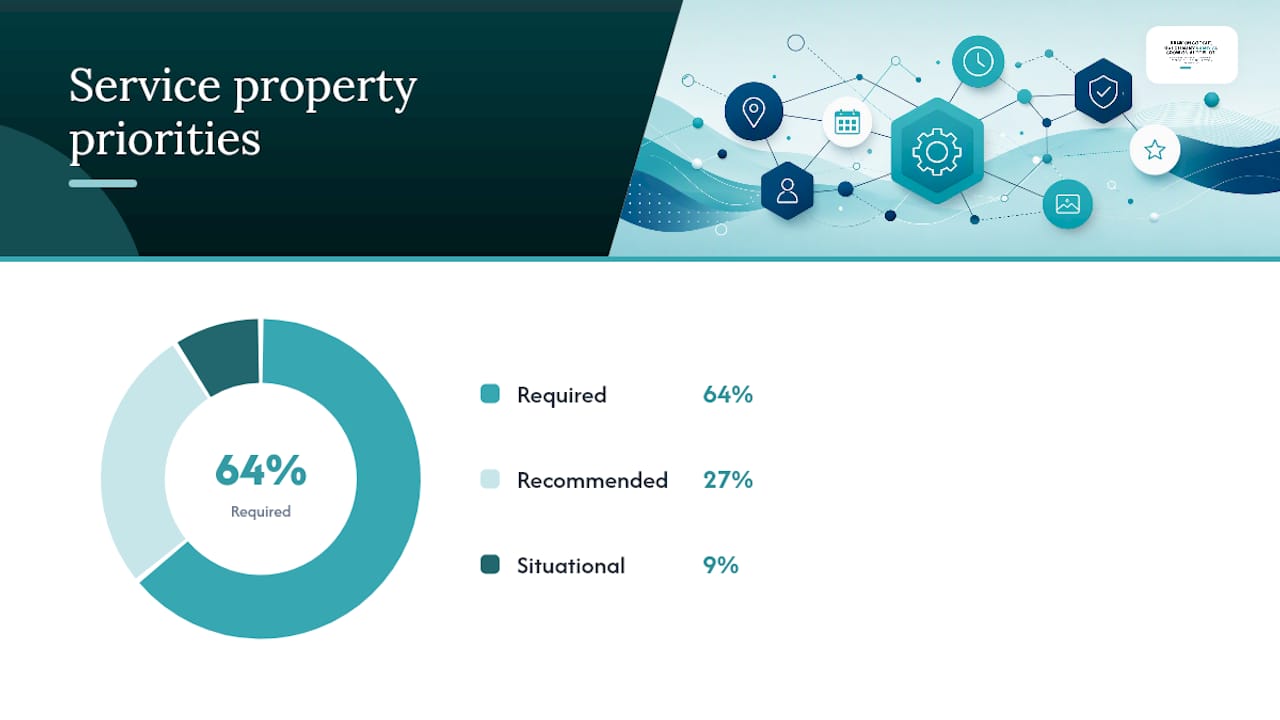
Not every property on the Schema deserves a slot in your markup. A handful carry the weight, and the rest are situational.
| Property | Priority | Why it matters |
|---|---|---|
@type |
Required | Declares the entity as Service (or a valid subtype) |
@id |
Required | Gives the service a stable, referenceable identity |
name |
Required | Must match the visible page title |
description |
Required | Should mirror the on-page copy, not a rewritten summary |
provider.@id |
Required | Links the service to your canonical Organization |
url |
Required | Canonical URL of the service page |
serviceType |
Required | The specific category of service offered |
areaServed |
Recommended | Where the service is actually delivered |
offers |
Recommended | Only if a price is visible on the page |
image |
Recommended | Helps AI systems and Google match visual context |
aggregateRating |
Situational | Add only with real, on-page third-party reviews |
A single service page needs only a lean object:
{
  "@context": "https://schema.org",
  "@type": "Service",
  "@id": "https://example.com/plumbing-repair#service",
  "name": "Emergency Plumbing Repair",
  "description": "24-hour plumbing repair for burst pipes, leaks, and water heater failures.",
  "provider": { "@id": "https://example.com/#organization" },
  "url": "https://example.com/plumbing-repair",
  "serviceType": "Plumbing Repair",
  "areaServed": "Austin, TX"
}
For a page listing several tiers, use hasOfferCatalog:
{
  "@type": "Service",
  "name": "HVAC Maintenance Plans",
  "provider": { "@id": "https://example.com/#organization" },
  "hasOfferCatalog": {
    "@type": "OfferCatalog",
    "name": "Maintenance Plans",
    "itemListElement": [
      { "@type": "Offer", "itemOffered": { "@type": "Service", "name": "Annual Tune-Up" } },
      { "@type": "Offer", "itemOffered": { "@type": "Service", "name": "Quarterly Inspection" } }
    ]
  }
}
Both examples mirror what a visitor actually sees on the page. That match matters more than completeness.
How Do You Implement Service JSON-LD on a Page?
Follow this sequence rather than guessing at structure:
- Build a canonical Organization
@idfirst. Something likehttps://example.com/#organization, defined once, referenced everywhere. - Reference that
@idfrom every Service through theproviderproperty instead of repeating the full Organization object on each page. - Use one Service object per service page for single-offer businesses. For pages listing multiple distinct services, wrap them in a
@grapharray with individual@idvalues so each keeps its own offers and ratings, a technique detailed in Latte. - Pick your
areaServedprecision deliberately. Plain text ("Austin, TX") works for most local businesses.AdministrativeAreafits state-level or regional service.GeoShapehandles a defined delivery radius or service polygon, and is worth the extra effort when precise geography actually changes disambiguation for AI systems trying to match a searcher’s location to your coverage area. - Add
offersonly when a price and currency (ISO 4217, like USD) are visible on the page. If pricing depends on scope, usePriceSpecificationwith aminPriceandmaxPriceinstead of inventing a flat number. - Deploy through whatever your CMS supports. WordPress users can inject JSON-LD through a schema plugin or a custom field in the page template; Webflow supports it through the page settings’ custom code field; static site generators just need it templated into the page’s
<head>.
Pro Tip: Name your @id fragments after the page’s function, not a generic label. #emergency-plumbing-service resolves cleanly across a @graph; #service1 does not, and it gets confusing fast once you have twenty service pages live.
If your business serves onsite or urgent-response customers, pairing this with documentation on structuring emergency service SEO helps you decide how granular areaServed needs to be.
When Should You Use Product or SoftwareApplication Instead?
If you sell software, SoftwareApplication is usually the better call. It maps more directly to the properties Google uses for app-related rich results, while Service carries no equivalent SERP treatment. Packaged, purchasable offerings, including boxed software licenses, do better under Product, which unlocks rich-result eligibility that Service alone cannot.
Co-typing is possible when a page genuinely fits both molds:
"@type": ["Service", "Product"]works for something like a managed installation package sold at a fixed price.- Borrow
offersandaggregateRatingfrom the Product side; keepproviderandareaServedfrom the Service side. - Only include
aggregateRatingwhen there are real, on-page third-party reviews behind it. Fabricated or borrowed ratings create more risk than benefit, and Schema App’s guidance on services markup is explicit that this property should reflect what a visitor can actually verify on the page.
Validation Pipeline and the Mistakes That Break Entity Linking
Run validation in a fixed order, every time. First, the Schema.org Validator checks syntax and confirms your types and properties are structured correctly. Second, run Google’s Rich Results Test to see whether any nested type (like FAQPage or Product) qualifies for a Google-supported feature. Third, manually click through every @id URL to confirm it actually resolves to the entity you intended.
The most common mistakes we see on service pages:
- Repeating the full Organization object inside every Service instead of referencing it by
@id. This breaks the entity graph and forces search engines to guess whether two listings describe the same business. - Adding invisible offers or ratings that don’t correspond to anything on the page. This is flagged directly in practitioner mistake checklists as one of the fastest ways to trigger a manual review.
- Setting
areaServedto “Worldwide” when the business only operates regionally. Vague geography weakens AI disambiguation rather than strengthening it. - Using
Productfor a labor-based offering just to chase rich-result eligibility, whenServiceis the semantically correct type.
Not every validator warning blocks you. A missing image property, for instance, is a warning worth deferring. A broken @id reference or a type mismatch is an error that breaks entity linking entirely, and that’s the kind you fix before anything goes live.
Best-Practices Checklist for a 10-Minute Audit
Run this against any live service page in about ten minutes:
- Content match: does every property value (name, description, price) match what’s visible on the page?
- Provider consistency: does
provider.@idpoint to the same Organization@idused across the entire site? - Offers accuracy: if
offersis present, is the price current and the currency correct? - AreaServed precision: does the geography level (text,
AdministrativeArea,GeoShape) match how the business actually delivers service? - FAQ parity: if the page has an FAQ section, does a matching
FAQPageschema exist alongside the Service block?
For naming, stick to a pattern like canonical URL plus a fragment: https://example.com/hvac-repair#service. It keeps @id values predictable across hundreds of pages, which matters once you’re managing a full site rather than one page.
Pro Tip: Re-run validation any time you change pricing, add a new location, or restructure a page’s headings. Schema drift is silent. Nothing tells you it’s stale until a rich result disappears or an AI answer engine starts citing outdated details. If you’re maintaining a large local site, pairing this checklist with a full technical SEO audit catches drift before it compounds.
How Stellor Handles Service Schema at Scale
Manually auditing @id consistency across fifty service pages is tedious. Across five hundred, it’s a full-time job. Stellor builds Service markup into every page template it publishes, so provider.@id stays consistent site-wide without manual patching, and weekly technical audits catch broken references before they cost you a citation.
The proof points are concrete: 30 GEO and SEO-optimized articles published to a customer’s CMS every month, a 4,000-site backlink network reinforcing the pages Stellor builds, and weekly audits covering schema completeness alongside traditional technical SEO factors. On top of that, Stellor tracks whether ChatGPT, Claude, Perplexity, and Gemini are actually citing the business, which is the real test of whether your entity graph is doing its job.
If you’re running this process yourself, your audit report should track the same three things: @id consistency, schema completeness per page, and whether AI systems are citing you at all.
Handling Updates and Versioning Over Time
Service schema isn’t something you set once and forget. Prices change, service areas expand, and offerings get discontinued, and stale markup creates a mismatch between what’s written in JSON-LD and what a visitor actually sees on the page. That gap is exactly what validators and AI crawlers both flag as a trust problem.
Treat every meaningful page edit as a trigger for a schema review. If you add a new service tier, update the hasOfferCatalog array rather than bolting a second Service object onto the same page. If your areaServed expands from one city to a three-county region, decide whether plain text still covers it accurately or whether it’s time to move to AdministrativeArea or a GeoShape polygon.
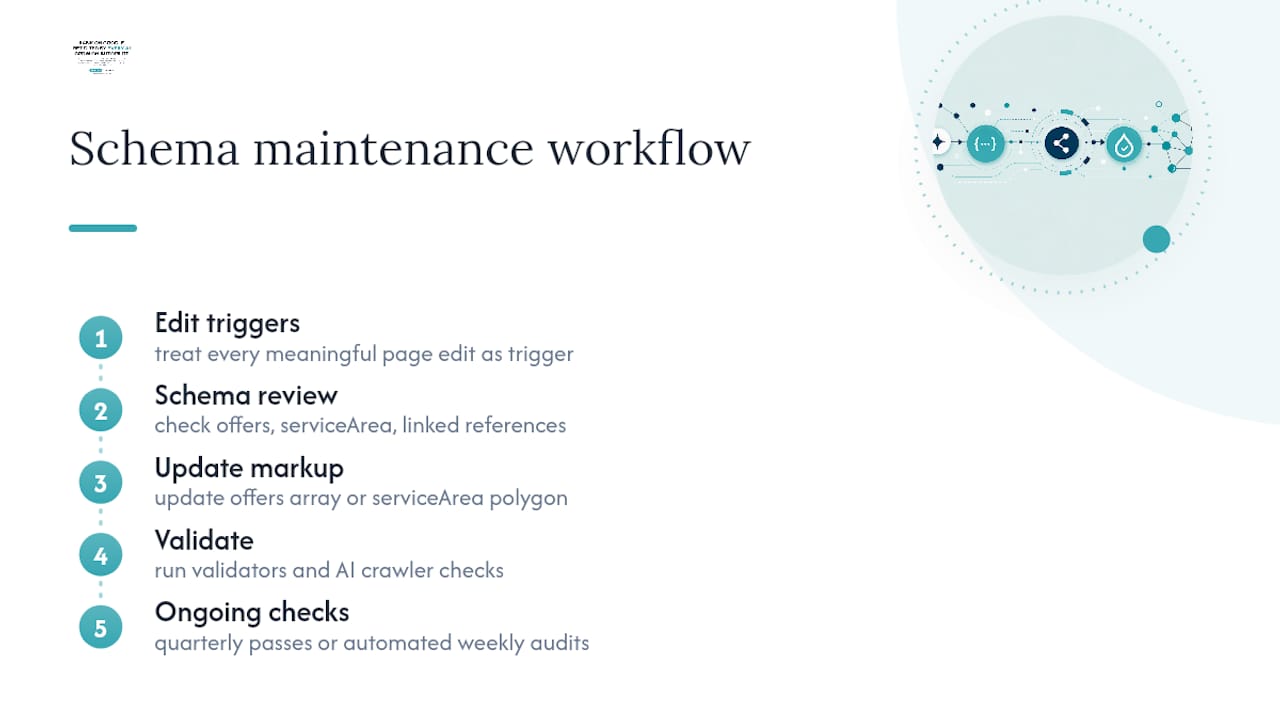
Versioning doesn’t need a formal system for most businesses, but it does need a habit. A quarterly pass through your @id map, checking that every reference still resolves and every price still matches what’s billed, catches drift before it becomes a real problem. Larger sites with dozens of service pages benefit from automating this check rather than relying on someone remembering to do it. That’s the same logic behind Stellor’s weekly audit cadence and it applies whether or not you’re using a platform to manage it.
One more habit worth building: whenever Google or schema.org updates guidance on a property (as happened with aggregateRating requirements tightening around visible review counts), sweep your existing pages for compliance rather than assuming old markup ages gracefully.
What Actually Moves the Needle on Service Schema
Most guides treat Service schema like a checkbox: add the properties, run the validator, move on. That framing undersells what’s actually happening. The real value isn’t the markup itself, it’s the entity graph you’re building underneath it. A Service object with a sloppy @id reference or a duplicated Organization block is worse than no markup at all, because it hands search engines and AI systems conflicting signals about who you are and what you offer.
The conventional advice also overweights rich-result chasing. Service alone doesn’t get you a SERP badge, and obsessing over that is a distraction from the thing that actually matters now: whether ChatGPT or Perplexity can confidently attribute a specific offering to your specific business when someone asks for a recommendation. That’s an entity-resolution problem, not a rich-result problem.
If you take one thing from this, prioritize @id hygiene before you worry about aggregateRating or extra properties. A clean, consistent entity graph across ten pages beats a feature-complete but disconnected Service block on one page every time.
— Cole
Automate Service Schema Instead of Hand-Coding It
Hand-coding JSON-LD across dozens of service pages works until your site grows past the size where you can track every @id reference in your head. Stellor builds Service markup directly into the page templates it publishes, so provider.@id stays consistent automatically instead of depending on someone remembering the pattern from six months ago.

Every plan includes weekly technical audits that flag schema drift, invisible offers, and broken entity references before they cost you a citation, backed by a 4,000-site backlink network and 30 GEO and SEO-optimized articles published monthly, as shown in the Remodeling Blog | Expressions Remodeling | St. Louis, MO. Stellor also tracks whether ChatGPT, Claude, Perplexity, and Gemini are actually citing your business by name, which is the real measure of whether your Service markup is doing its job. Start with a free AI Visibility Audit delivered within 48 hours, or run a 3-day free trial with no card required, through the Stellor product page.
Sources
- Schema
- Schema Markup Validator
- Geodocs
- Latte
- How to Create Service Schema Markup for Businesses | Schema App
FAQ
What Is Schema Markup, With an Example?
Schema markup is structured data, usually written as JSON-LD, that tells search engines and AI systems exactly what a page’s content means. A Service example includes name, provider, and serviceType describing an offering like “Emergency Plumbing Repair” in Austin, Texas.
How Do I Know if My Website Has Schema Markup?
View the page source and search for application/ld+json, or run the URL through Google’s Rich Results Test, which reports every structured data type it detects on the page.
What Are the Four Main Schema Types for Service Businesses?
For most service businesses, the practical baseline is LocalBusiness, Service, FAQPage, and Article, a combination several implementation guides recommend for covering entity identity, offerings, common questions, and content.
How Do I Generate Service Schema Markup?
Write it manually using the schema.org property reference, use a generator tool to produce a JSON-LD starting point, or use a platform like Stellor that builds it directly into page templates and keeps @id references consistent automatically.
Does Service Schema Guarantee a Rich Result in Google?
No. Google has no dedicated rich result for Service alone, so its main value today is entity clarity for AI answer engines and search crawlers rather than a guaranteed SERP feature.
Can I Use Both Service and Product on the Same Page?
Yes, through co-typing ("@type": ["Service", "Product"]), but only when the page genuinely supports both property sets, including visible pricing and, if used, real on-page reviews behind any aggregateRating.