
Service area business SEO comes down to three moving parts: an accurately configured Google Business Profile, a set of unique service-area web pages carrying areaServed schema, and a steady stream of local proof signals like reviews and geo-relevant backlinks. Get those three right and you can see Google Business Profile changes reflected in GBP Insights within a few weeks, though rankings tied to your website content and backlinks usually take two to four months to move. Start today: verify your current service area list, publish a small set of localized pages for key cities, and turn on review requests for every closed job.
Here’s your first 72 hours:
- Confirm your GBP service area matches where you actually send trucks or techs, using Google’s service-area setup guide.
- Hide your business address if you don’t take walk-in customers, per Google’s own policy.
- Publish or update three city-specific pages with
LocalBusinessschema, following Search Engine Land’s service-area page standards. - Send review requests to your recently completed jobs, mentioning the city or neighborhood if possible.
- Check your NAP (name, address, phone) consistency across your top five directory listings.
- Read up on SEO strategies for local services and local SEO for service businesses if you want a fuller framework before you start.
Pro Tip: Screenshot your GBP service area settings before you make any changes. If rankings dip after an edit, you’ll want a baseline to compare against.
Key Takeaways
Service area business SEO succeeds when GBP configuration, unique localized web pages, and local proof signals like reviews and backlinks all reinforce each other.
| Point | Details |
|---|---|
| Configure GBP accurately | Set your service area by city or ZIP, and hide your address if you don’t accept walk-ins. |
| Build unique local pages | Publish service-area pages for several important cities with real local content and areaServed schema. |
| Prioritize local reviews | Reviews mentioning neighborhoods act as geo-signals that generic backlinks can’t replicate. |
| Track the right metrics | Watch GBP Insights, Search Console impressions, and review velocity for realistic two-to-four-month gains. |
| Automate the repetitive work | Stellor publishes service-area pages, builds backlinks, and tracks AI visibility so the playbook runs without manual effort each month. |
Table of Contents
- How Does Google’s Service Area Model Actually Work?
- How Do You Set or Edit a Service Area in Google Business Profile?
- Which GBP Fields Actually Move the Needle for Service Areas?
- What Should Your Website Do to Support Service-Area Rankings?
- Why Do Reviews and Local Backlinks Matter So Much?
- How Do You Track Progress and What’s a Realistic Timeline?
- What GBP Mistakes Trigger Suspensions or Ranking Drops?
- How Should Multi-Location and Hybrid Businesses Structure Coverage?
- Where Does This Guidance Come From?
- What I’d Do First If I Were Running Your Local SEO This Week
- Let Stellor Handle the Parts That Take the Most Time
- Sources
- FAQ
How Does Google’s Service Area Model Actually Work?
Google ranks local results using three factors: relevance, distance, and prominence, and it weighs all three together rather than picking a winner. For a storefront business, distance is straightforward. Google measures from your verified address. For a service area business (SAB) with no public-facing location, Google instead estimates distance from the searcher to the center of the areas you’ve defined, which is why your coverage settings carry more weight than they would for a retail shop.
Hiding your address changes this calculation. Once you mark your profile as service-area only, Google stops displaying your exact address and shifts to a broader radius model based on the cities, ZIP codes, or counties you list. A rough industry rule of thumb: keep your declared area within about a two-hour drive or 100 miles of your dispatch point. Push much further and Google, along with your own reviewers, start to question whether you actually serve those areas.
- Define service areas by city or county name, not vague regional labels like “Tri-State Area.”
- Use a hybrid listing (storefront plus service area) only if customers can walk in.
- Keep your declared radius realistic relative to your actual dispatch and staffing.
Pro Tip: If you run a single-hub operation with a 40-mile service radius, don’t list 15 cities just because they’re technically reachable. Google’s own ranking guidance rewards profiles that look focused, not sprawling.
How Do You Set or Edit a Service Area in Google Business Profile?
The exact sequence: sign in to your profile at Business, select the location you want to edit, click “Edit profile,” go to the “Service area” section, and add or remove the cities, ZIP codes, or counties you serve. Save the change, and Google typically reflects it within a day or two, though full re-indexing of how you rank in those areas can take longer.
Before you touch the settings, prepare four things:
- A finalized list of cities or ZIP codes you can genuinely service, based on real job history, not aspiration.
- Your primary and secondary phone numbers, since these need to stay consistent with your website and directory listings.
- A current service list matching what you actually offer today, not last year’s lineup.
- A handful of recent job photos you can attach to posts or Q&A once the profile is updated.
Two mistakes trip up most owners here. First, overbroad coverage: adding 20 ZIP codes because they’re within driving distance, even though you’ve never worked a job in half of them. Second, virtual office confusion: renting a mailbox or coworking address and treating it like a real office triggers a policy violation, since Google requires the address on file to be a legitimate business location if one is displayed at all.
Once your service area is set, verification status matters more than most owners realize. An unverified or pending profile won’t show up in the map pack no matter how well the service area is configured, so check your verification status first if visibility seems stuck.
Pro Tip: Keep a simple folder of proof for each city you claim: a dated job photo, a redacted invoice, or a customer text confirming the address. If Google ever flags your profile for review, this evidence speeds up reinstatement dramatically.
Which GBP Fields Actually Move the Needle for Service Areas?
Your primary category, service list, photos, and posts carry more ranking weight than most of the fields owners spend time on, because they map directly to the relevance and prominence factors Google uses to rank local results. Get the primary category wrong, and everything downstream, from map pack visibility to which searches trigger your profile, suffers.
- Choose the single most accurate primary category, then add secondary categories only if they reflect real services.
- Write each service description using the phrasing customers actually search, not internal jargon (e.g. “emergency drain clearing” instead of “hydro-jetting services”).
- Upload proof-of-work photos regularly. Job-site shots with visible tools or branded vehicles perform better than stock imagery.
- Post weekly using a mix of offers, project photos, and answered questions, since GBP posts are one of the few fields Google refreshes frequently in ranking signals.
- Link your GBP website field to the specific service-area page for your primary city, not your homepage.
Pro Tip: Turn on GBP messaging and booking links if your job type supports quick quotes. Profiles with active messaging tend to convert map-pack views into leads faster, since customers can skip the phone call entirely.
What Should Your Website Do to Support Service-Area Rankings?
Build a small set of high-quality service-area pages, one for each of your top five revenue-producing cities or ZIP codes, rather than dozens of thin, templated pages. Search Engine Land’s guidance on service-area pages is blunt about this: search engines now penalize doorway pages that just swap a city name into an otherwise identical template.

Each page needs the city name in both the URL and title tag, genuinely local copy (mention specific neighborhoods, landmarks, or common local issues your service solves), and a contact call-to-action tied to that specific area. An embedded map and a couple of localized customer reviews add real utility, not just SEO padding.
On the technical side, mark up each page with LocalBusiness or Service schema and the areaServed property, using GeoShape when you need to define an irregular coverage zone rather than a simple radius. Schema.org’s documentation on the Service type covers the exact properties to use.
- Start with your top cities by revenue, not the ones with the biggest population.
- Link service-area pages from your main navigation and an HTML sitemap, not just buried footer links.
- Cross-link from your core service pages (e.g. “Water Heater Repair”) to each relevant city page.
- Only build a true location page, with a street address if you actually staff an office there.
Why Do Reviews and Local Backlinks Matter So Much?
For service area businesses, a handful of reviews that mention your city or neighborhood by name often does more for local pack rankings than a stack of generic industry backlinks. Google’s algorithm reads review text for local context, and a customer writing “best plumber in the Riverside area” is handing you a geo-signal you can’t easily fabricate.
- Ask for reviews immediately after job completion, and prompt customers to mention their neighborhood if it feels natural.
- Run a quarterly citation audit across your top directories to catch conflicting NAP data.
- Pursue local backlinks through sponsorships, community event pages, and local news mentions rather than broad industry directories, following the tactics in Trystellor’s local SEO link-building guide.
- Consider a partner or supplier with strong local ties, like System Wide Services in Orange County, as a model for how coverage pages and local content work together.
Mobile behavior makes this urgent. Statista’s tracking of mobile traffic share shows the majority of web traffic now comes from phones, which means most “near me” searches happen on a device where the map pack and reviews are often the only thing a searcher sees before calling.
How Do You Track Progress and What’s a Realistic Timeline?
Track GBP Insights for calls and direction requests, Google Search Console for organic impressions on city-specific keywords, and a rank tracker capable of pulling results from local centroids rather than your office IP address. Review velocity and location mentions round out the picture.
- Local pack impressions and direction requests (GBP Insights)
- Organic clicks and impressions for city-modified keywords (Search Console)
- Call and form submission volume by source
- Review velocity and the frequency of location mentions inside reviews
GBP field edits, like updating your service area or category, can shift visibility within a couple of weeks. Website and backlink-driven ranking gains typically take two to four months, since Google needs to crawl, index, and reassess prominence signals across multiple pages. Platforms like Stellor track this full picture automatically, which matters if you’re managing more than a couple of cities at once. For a deeper look at what measurable progress looks like, see Trystellor’s guide to measurable SEO results.
What GBP Mistakes Trigger Suspensions or Ranking Drops?
The most common errors: service areas set too broad, addresses that don’t reflect a real staffed location, keyword-stuffed business names, and mass-produced city pages that read like the same template with a find-and-replace.
- Hide your address entirely if you don’t accept walk-in customers, rather than listing a virtual office.
- Replace templated “city swap” pages with unique local content, per Search Engine Land’s warnings on doorway pages.
- Keep your business name exactly as it appears on signage and invoices, no added keywords.
- If suspended, use Google’s reinstatement request process and be ready to submit proof of a legitimate local presence.
Pro Tip: Before publishing a batch of new city pages, gather job photos and signed customer notes for each area first. Proof of real work is your best defense if Google ever questions your coverage claims.
How Should Multi-Location and Hybrid Businesses Structure Coverage?
Build separate location pages and GBP profiles only where you have a staffed office. Everywhere else, rely on service-area pages tied to a single, well-configured profile rather than duplicating listings you can’t legitimately support.
- Map your service area to your actual dispatch hub, and cap each profile’s radius at a realistic driving distance.
- For a one-hub, multi-route model, rotate proof-of-work photos and review requests across every zone you serve, not just your closest neighborhoods.
- Multi-location operators should read Trystellor’s guide to managing SEO across multiple locations before creating additional profiles.
Pro Tip: Use GeoShape schema instead of a simple radius when your actual coverage follows a river, highway corridor, or county line rather than a circle. It’s more accurate, and accuracy is what keeps you out of policy trouble.
Where Does This Guidance Come From?
These recommendations draw directly from Google’s own Business Profile documentation, published guides from Search Engine Land and Search Engine Journal, and patterns observed across Trystellor’s client base of service-area businesses.
- Reviewed Google’s official service-area and local ranking support documentation
- Cross-referenced current guidance from Search Engine Land and Search Engine Journal on service-area page structure
- Applied findings from GBP configuration tests and client-side A/B changes tracked through the Trystellor platform
For background on GBP fundamentals, see Trystellor’s guide to what Google Business Profile is.
What I’d Do First If I Were Running Your Local SEO This Week
Week one, I’d audit the service area settings and NAP consistency before touching content, because a mislabeled profile makes every other fix less effective.
- Fix GBP service area and hide the address if there’s no walk-in traffic.
- Schedule a citation audit across your top five directories.
- Turn on a review request flow for every closed job, immediately.
- Draft your first three city pages, outsourcing the writing if you don’t have the bandwidth, but keep schema and local specifics in-house review.
Let Stellor Handle the Parts That Take the Most Time
Everything above works, but doing it manually across five, ten, or thirty service-area pages eats an entire week every month. Stellor automates the GEO and SEO publishing, backlink building, and AI visibility tracking described in this guide, so you can follow the same playbook without hiring a content writer, a link-building agency, and a rank-tracking tool separately.

Here’s what that looks like in practice:
- Thirty GEO and SEO-optimized articles published to your site monthly, including the city-specific service-area pages this guide recommends
- Access to a 4,000-site backlink network that builds the geo-relevant links local rankings depend on
- Weekly technical audits catching schema gaps,
areaServederrors, and mobile issues before they cost you rankings - Weekly tracking of your visibility across ChatGPT, Claude, Perplexity, and Gemini, so you know when your business gets recommended and when a competitor does instead
Start a 3-day free trial with no card required and see your current Stellor product audit within 48 hours.
Sources
- Manage your service areas for service-area & hybrid businesses
- Service Area Pages: Boost local SEO across locations
FAQ
What Is the Service Area of a Business?
A business’s service area is the set of cities, ZIP codes, or counties it travels to in order to deliver work, as opposed to a fixed location customers visit. Google lets you define this directly in your Business Profile settings.
What Is SEO for Business Services?
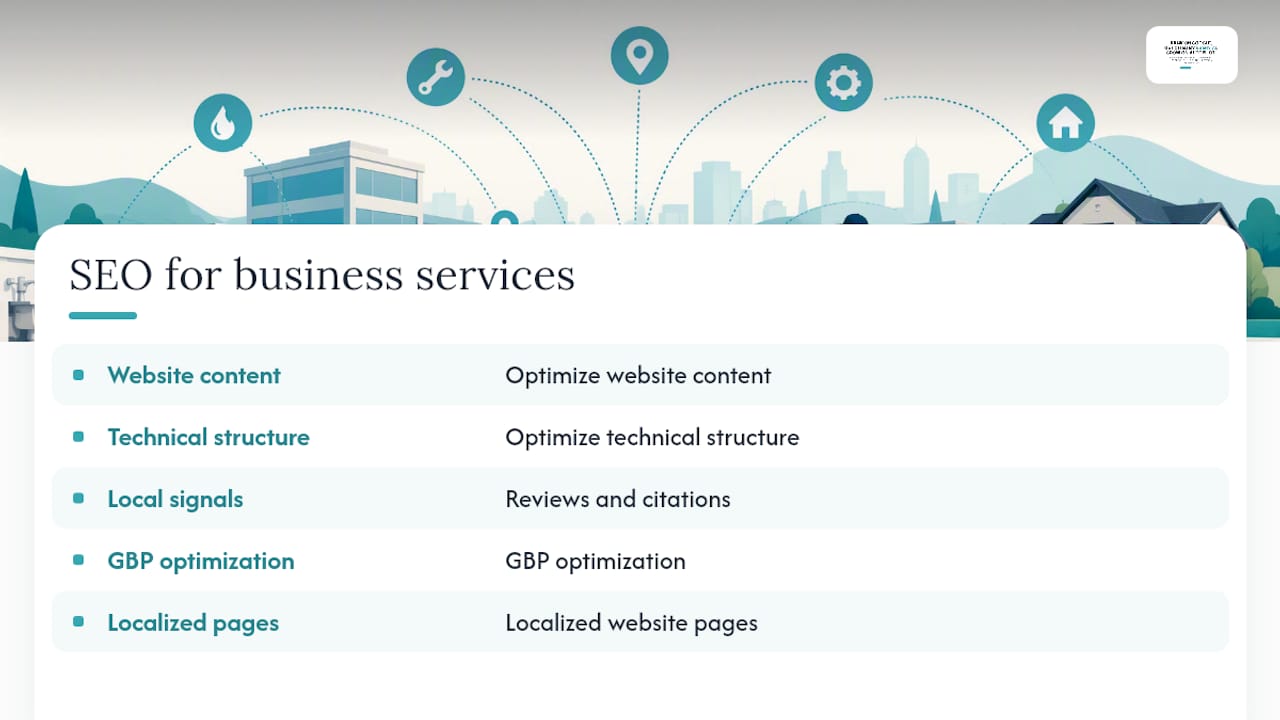
SEO for business services means optimizing your website content, technical structure, and local signals like reviews and citations so that potential customers find you through organic search rather than paid ads alone. For service area businesses, this includes GBP optimization and localized website pages.
What Does “Service Area” Mean on a Google Business Profile?
On a Google Business Profile, “service area” is a setting that tells Google which cities, ZIP codes, or counties you serve, used in place of a public storefront address for ranking and display purposes.
What Is the Service Business Area of Marketing?
In marketing, a service area refers to the specific geographic region a business promotes itself in and targets with localized advertising, content, and local search optimization, rather than the broader industry as a whole.
How Long Does It Take to See Service Area SEO Results?
GBP setting changes can influence visibility within a couple of weeks, while website content and backlink-driven ranking improvements typically take two to four months to fully materialize.
Can I Use Multiple Google Business Profiles for One Service Area Business?
You can use multiple profiles only if each one represents a legitimate, separately staffed location or dispatch hub; creating duplicate profiles for the same address violates Google’s policies and risks suspension.