

Crawlability is the gatekeeper to every AI citation your business will ever earn. If GPTBot, ClaudeBot, or PerplexityBot cannot fetch and parse your raw HTML, your content simply does not exist to ChatGPT, Claude, or Perplexity, no matter how good the writing is.
Google Search Central has spent years documenting how crawlers read pages, and the same principles now apply to AI engines: they need server-rendered HTML, not JavaScript that only resolves in a browser, and they need Schema markup to understand what a page actually says. Miss either one, and you’re invisible to the fastest-growing referral channel in search. Retailers with strong AI visibility saw AI-driven traffic jump 393% in a single quarter, which tells you what’s at stake when crawlability breaks.
Three fixes matter more than anything else right now:
- Unblock LLM user-agents in robots.txt. Check for GPTBot, ClaudeBot, PerplexityBot, and Google-Extended specifically. A blanket disallow written years ago for a different reason can quietly lock out every AI engine you’re trying to reach.
- Put your titles, H1, and core copy in server-side HTML. If a bot has to execute JavaScript to see your main claim, most won’t bother.
- Add Article or FAQ schema to your priority pages. Structured data gives AI engines a clean, unambiguous way to lift a fact and attribute it to you instead of a competitor.
If you’re auditing your own logs, watch for these four user-agent strings before anything else: GPTBot, ClaudeBot, PerplexityBot, and Google-Extended. Their presence, or absence, tells you more about your AI visibility than any ranking tool. For a broader look at how AI is reshaping discovery for service businesses, see how AI search is changing local business discovery, and for a plumber-specific example of applying these fixes to real service pages, check the local ranking guide for plumbers.
Key Takeaways
Crawlability determines whether AI engines can fetch, parse, and cite your content, and fixing access, rendering, and structure issues drives measurable citation gains within weeks.
| Point | Details |
|---|---|
| Check robots.txt first | Confirm GPTBot, ClaudeBot, PerplexityBot, and Google-Extended are explicitly allowed, not caught by an old blanket rule. |
| Fix rendering before content | Server-render titles, H1s, and core facts so bots don’t need JavaScript execution to read them. |
| Add schema to priority pages | Article and FAQPage schema help AI engines extract and attribute quotable facts correctly. |
| Monitor server logs weekly | Track fetch success rate and watch for 403 or 429 responses from known AI user-agents. |
| Structure content for chunking | Use clear H2/H3 hierarchies and short paragraphs so retrieval systems can map passages to queries. |
Table of Contents
- What Is the Role of Crawlability in AI Engine Visibility?
- What Blocks AI Crawlers Most Often, and How Do You Fix Each One?
- Should You Configure Robots.txt and llms.txt for AI Bots?
- Which Schema and Metadata Help AI Engines Cite You?
- How Do You Detect AI Crawler Activity on Your Site?
- What Should You Fix First, and by When?
- A Real Example: Fixing Crawlability Produced Faster Citations
- What Does Stellor’s AI Visibility Data Show About Crawlability Fixes?
- The One Fix Most Teams Skip
- Where to Learn More About AI Crawlability
- Sources
- FAQ
What Is the Role of Crawlability in AI Engine Visibility?
Crawlability decides whether an AI engine can even attempt to cite you. Visibility in ChatGPT, Perplexity, or Gemini isn’t about keyword density or backlink count anymore; it’s about whether an automated agent can successfully request your page, read its content without executing code, and extract a clean, quotable fact. Get that wrong and every other optimization effort is wasted.
This matters more with AI engines than it ever did with traditional search because the failure mode is silent. Googlebot has decades of tolerance built in for messy sites; it renders JavaScript, retries failed fetches, and indexes pages even when they’re technically imperfect. AI crawlers are far less forgiving. Many skip JavaScript rendering entirely, some respect aggressive timeout windows, and most treat a single failed fetch as a reason to move on rather than retry. The JetOctopus AI crawlability guide frames this as a three-layer problem: access, rendering, and structure. Fail any one layer and the page might as well not exist to the model that’s answering your buyer’s question.
There’s also a distinction most marketers miss: being crawled and being cited are two different events. A bot can fetch your page for training data collection without that visit ever translating into a citation in a live answer. Live citation engines like Perplexity and the browsing modes in ChatGPT run separate retrieval passes, often close to real time, pulling from an index built by chunking your content into passages, embedding those passages as vectors, and retrieving the closest match when a user asks a question. If your HTML isn’t structured into clean, chunkable sections, the retrieval step has nothing usable to work with even if the crawl succeeded.
How AI crawlers differ from Googlebot
| Factor | Googlebot | Typical AI crawler (GPTBot, ClaudeBot, PerplexityBot) |
|---|---|---|
| JavaScript rendering | Renders JS in a headless Chromium queue | Often skips or limits JS execution |
| Crawl frequency | Continuous, prioritized by page value | Varies widely; some crawl in bursts tied to model training cycles |
| Timeout tolerance | Generally forgiving, retries later | Frequently stricter, may abandon slow-loading pages |
| Purpose | Indexing for search ranking | Training data collection or live retrieval for citations |
| Respect for robots.txt | Fully compliant, well documented | Compliant but managed per bot, with separate allow/block rules needed for each |
Some AI-native retrieval systems skip raw HTML entirely in favor of structured JSON responses. The OpenSearch Engine project is a useful example: it’s built to return compact, structured JSON to agents, complete with confidence scores and timestamps, because raw HTML parsing is expensive in tokens and unreliable in quality. That’s a preview of where agent-first retrieval is heading, and it’s another reason flat, unstructured pages lose out to well-organized ones.
What Blocks AI Crawlers Most Often, and How Do You Fix Each One?
Most crawlability failures fall into a short list of repeat offenders. Here’s what to check first, and the fix for each:
- JavaScript-only rendering. If your framework injects the page title, body copy, or key facts client-side, many AI crawlers never see them. Fix: server-side render or pre-render the critical content, even if the rest of the page stays a JS app.
- Robots.txt or WAF blocks. A security rule meant to stop scrapers can accidentally catch GPTBot or ClaudeBot too. Fix: explicitly allowlist the LLM user-agents you want to reach.
- CAPTCHAs and aggressive rate limits. Bot-challenge pages that protect against spam also stop legitimate AI crawlers cold. Fix: exempt known AI user-agents from challenge rules where your security posture allows it.
- Orphan or deeply nested pages. If a page needs five clicks to reach from your homepage, no crawler, human or AI, is likely to find it. Fix: flatten your navigation and add internal links from high-traffic pages, a fix covered in more depth in this local SEO optimization guide.
- Missing structured data. Without schema, a bot has to guess what a page is about. Fix: add Article, FAQPage, or Product schema depending on page type.
- Hidden content behind tabs or accordions. If a fact only appears after a user clicks, it may never render in the crawler’s view. Fix: move critical facts into the default visible HTML, even if you keep the tab UI for humans.
- Slow load times and long timeouts. A page that takes eight seconds to respond risks getting abandoned mid-fetch. Fix: compress assets and defer non-critical scripts so the core content loads first.
Pro Tip: Expose a clean, factual excerpt near the top of gated or paywalled pages so AI engines can cite your core claim, while keeping the deeper content, pricing details, or proprietary data behind the gate where it belongs.
Should You Configure Robots.txt and llms.txt for AI Bots?
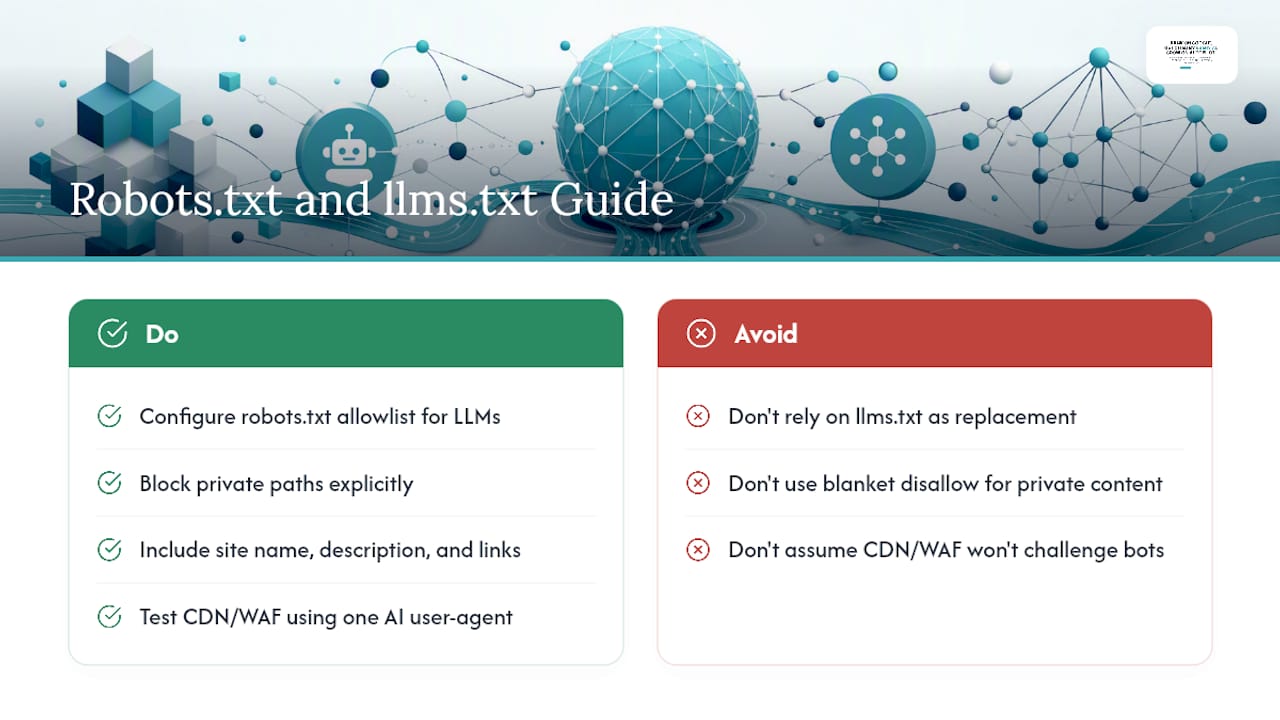
Yes, and it takes less time than most teams assume. Your robots.txt file is still the first thing any well-behaved crawler checks, AI or otherwise, so a few deliberate lines can open or close the door to specific bots.
A basic allowlist for the major LLM crawlers looks like this:
User-agent: GPTBot
Allow: /

User-agent: ClaudeBot
Allow: /

User-agent: PerplexityBot
Allow: /

User-agent: Google-Extended
Allow: /
If you need to keep a section private, block it explicitly by path rather than relying on a blanket disallow that might catch pages you actually want indexed:
User-agent: GPTBot
Disallow: /account/
Disallow: /internal-tools/
The emerging llms.txt file works differently. It’s a proposed plain-text standard, placed at your site root, meant to give AI agents a curated summary of your most important pages, similar in spirit to a sitemap but written for language models rather than crawlers indexing links. Adoption is still uneven across AI platforms, so treat llms.txt as a forward-looking addition rather than a replacement for solid robots.txt hygiene and clean HTML. A basic version lists your site name, a short description, and links to your most citation-worthy pages, grouped by category.
Site operators increasingly face a real tension between maximizing discovery and protecting content from unrestricted reuse, and the debate over opt-out protocols shows there’s no universal consensus yet on where that line should sit.
That tension, explored in Common Crawl’s discussion of discovery versus privacy, is worth understanding before you write a blanket block. Decide deliberately what you want found, and don’t let a security default make that decision for you.
Pro Tip: Before changing any CDN or WAF rule, test it with a single AI user-agent on a low-traffic page first. Bot-challenge rules and IP-reputation blocks are often set by a security vendor’s default configuration, not your own team, so check with your CDN provider whether GPTBot, ClaudeBot, or PerplexityBot are being challenged or rate-limited before you assume your robots.txt is the only gate in play.
Which Schema and Metadata Help AI Engines Cite You?
Structured data is how you tell an AI engine exactly what your page is, rather than hoping it infers correctly. Schema.org remains the standard vocabulary for this, and certain types do more heavy lifting than others depending on your page.
- Article schema for blog posts and guides, so the engine can identify headline, author, and publish date at a glance.
- FAQPage schema for question-and-answer content, which maps almost directly onto how AI engines format their own answers.
- HowTo schema for step-by-step processes, useful when your content answers a “how do I” query.
- Product schema for e-commerce pages, covering price, availability, and reviews.
- Organization schema on your homepage or about page, establishing who’s behind the content, a signal that matters for trust.
Beyond schema types, a short metadata checklist keeps your pages legible:
- A stable, self-referencing canonical tag so bots don’t split authority across duplicate URLs.
- Correct robots meta tags, confirming the page is indexable and not accidentally set to
noindex. - Visible publish and last-modified dates, since AI engines weigh freshness when choosing what to cite.
- Named author and publisher information, tied to Organization schema where possible.
- Descriptive URL slugs that describe the content rather than a string of numbers or parameters.
A minimal Article JSON-LD snippet looks like this:
{
  "@context": "https://schema.org",
  "@type": "Article",
  "headline": "Your Page Title",
  "datePublished": "2026-01-15",
  "dateModified": "2026-02-01",
  "author": {
    "@type": "Organization",
    "name": "Your Business Name"
  }
}
Pro Tip: Render your headline, publish date, and key facts directly in the HTML body, not just inside the JSON-LD block. Schema helps machines confirm what a page is about, but the underlying text still has to be present and readable for chunking and citation to work.
How Do You Detect AI Crawler Activity on Your Site?
Server logs are the only reliable proof that an AI crawler visited your site, and they show far more than analytics dashboards ever will. A typical GPTBot log line looks something like this:
203.0.113.42 - - [15/Feb/2026:10:22:31 +0000] "GET /services/plumbing-repair HTTP/1.1" 200 14832 "-" "Mozilla/5.0 (compatible; GPTBot/1.1; +https://openai.com/gptbot)"
ClaudeBot and PerplexityBot log similarly, each with a distinct user-agent string identifying the crawler by name. The status code at the end tells you everything: a 200 means success, a 403 means the bot was blocked, and a 429 means it was rate-limited and likely gave up before reading your content.
| Signal to check | What it tells you | Where to find it |
|---|---|---|
| User-agent string | Which specific AI crawler visited | Server or CDN access logs |
| HTTP status code | Whether the fetch succeeded, was blocked, or was throttled | Server logs, filtered by UA |
| Fetch frequency over time | Whether a bot revisits pages after updates | Log aggregation over weeks |
| Sitemap vs. crawl coverage gap | Pages submitted but never fetched | Cross-reference sitemap with log data |
| Rendered vs. raw content mismatch | Whether JS-dependent content is actually visible to bots | Compare raw HTML fetch to rendered DOM |
The practical workflow: filter your CDN logs for the four major AI user-agent strings, then cross-reference successful 200 responses against your sitemap to find coverage gaps, pages you expected to be crawled that never show up. Combining scheduled site crawls, server logs, and live LLM tracking is the only way to catch pages that were technically fetched but never actually parsed correctly, a pattern the JetOctopus methodology calls out specifically. A good monitoring setup should give you real-time alerts when a known AI bot hits a 403 or 429, a revisit-frequency chart per bot, and automatic flags when rendered content doesn’t match raw HTML.
What Should You Fix First, and by When?
Treat this as a real project with a deadline, not a someday list. Here’s the order that produces results fastest.
In the first 30 days:
- Audit and unblock the four key LLM user-agents in robots.txt and any WAF or CDN bot-challenge rules.
- Verify raw-HTML presence for your top 50 pages by comparing the rendered DOM to the raw server response.
- Add Article or FAQ schema to your highest-priority service and comparison pages.
- Submit updated sitemaps and use IndexNow where your platform supports it, so search engines and AI crawlers alike see fresh URLs faster.
By 90 days:
- Migrate JavaScript-heavy templates to server-side rendering or a hybrid rendering approach, prioritizing your highest-traffic page types first. The guide to modernizing legacy SEO strategy for AI search walks through this migration in more detail.
- Fix orphan pages and flatten navigation depth so nothing critical sits more than two clicks from your homepage.
- Establish a weekly crawl-log baseline so you can spot when a deployment accidentally reintroduces a block.
Track these KPIs weekly, not quarterly:
- Fetch success rate: the percentage of AI bot requests returning a
200instead of a403or429. - AI revisit frequency: how often GPTBot, ClaudeBot, and PerplexityBot return to updated pages.
- Citations tracked: how often your brand shows up when you query ChatGPT, Claude, Perplexity, and Gemini with your buyers’ actual questions.
- Organic referral lift: traffic arriving from AI answer engines, tracked separately from traditional organic search.
For teams building this into a standing process rather than a one-time cleanup, the in-house SEO priority checklist offers a useful framework for keeping crawl health on a recurring schedule instead of letting it slip after the initial push.
A Real Example: Fixing Crawlability Produced Faster Citations
A home services company migrated its service pages from a client-side-rendered React template to server-rendered HTML, added Article schema to 40 priority pages, and removed a WAF rule that had been silently challenging every non-Google bot for over a year. Within weeks, crawl logs showed GPTBot and PerplexityBot successfully fetching pages that had previously returned 403 responses on every attempt.
The gap between “crawled” and “cited” often comes down to whether the bot could actually read the page, not whether it tried to visit at all.
The before-and-after tells the story clearly. Before the fix, AI crawler fetch attempts on priority pages were failing at the WAF layer more often than they were succeeding. After removing the blanket challenge rule and exposing core service details in raw HTML, successful fetches became the norm instead of the exception, and the business began appearing in AI-generated answers to buyer queries within the same month. That pattern lines up with the broader industry finding that a majority of sites carry at least one unresolved AI-crawlability barrier, whether that’s rendering, robots rules, or CDN configuration, and that fixing even one of those barriers can unlock fetches that had been failing silently for months.
What Does Stellor’s AI Visibility Data Show About Crawlability Fixes?
Stellor tracks AI visibility by running weekly agent queries against ChatGPT, Claude, Perplexity, and Gemini, using the exact phrases real buyers type, things like “best plumber near me” or “top-rated small business accountant.” Each query gets logged for whether the customer’s business appears, which competitors are cited instead, and how that citation landscape shifts week over week.
Across accounts where server-side rendering was the primary fix applied to previously JavaScript-blocked pages, Stellor’s tracking has observed citation counts climb notably within a few weeks of the change, though the exact lift depends heavily on how competitive the query category is and how many other technical issues existed alongside the rendering problem. That range is directional, not a guarantee, since AI engines weigh dozens of factors beyond crawlability alone.
- Stellor’s platform publishes 30 GEO and SEO-optimized articles per month, each built with the schema markup and server-rendered structure that AI crawlers need to parse cleanly.
- A 4,000-site backlink network builds the authority signals that still factor into which sources AI engines trust enough to cite.
- Weekly technical audits check the same crawlability signals covered in this article: robots.txt access, schema completeness, and raw-HTML presence, so issues get caught before they cost you a quarter of missed citations.
Pro Tip: Run your own before-and-after log comparison whenever you ship a major template change. A single deployment that moves critical content behind client-side rendering can undo months of crawlability work overnight, and log monitoring is the only way you’ll catch it fast.
If you want an outside look at where your own site stands, Stellor’s product page outlines the free AI Visibility Audit: a 15-minute setup followed by a report within 48 hours covering your current AI citation status, a competitor benchmark, a full technical crawlability review, and a 90-day action plan. You keep the audit even if you never subscribe.
The One Fix Most Teams Skip
Most teams treat AI crawlability as a content problem when it’s actually an infrastructure problem. You can publish the most well-researched page on the internet, and if it’s rendered client-side behind a WAF rule nobody’s audited since 2022, it will never reach an AI engine’s index. The technical layer isn’t glamorous, but it’s the layer that decides whether anything else you do even gets a chance to matter.
If you do exactly one thing this week, pull your server logs and filter for GPTBot, ClaudeBot, and PerplexityBot. Look at the status codes. If you see a wall of 403s where you expected 200s, you’ve found your highest-leverage fix, and it’s probably a robots.txt line or a WAF rule, not a content gap at all.

Where to Learn More About AI Crawlability
A handful of sources are worth bookmarking if you’re building out a crawlability process beyond this article.
- Google Search Central - Crawling & indexing: the official policy reference for robots.txt, canonicalization, and rendering behavior.
- Schema: the authoritative vocabulary guide for every schema type mentioned in this article.
- CommonCrawl - Balancing discovery and privacy: background on opt-out protocols and the discovery-versus-privacy tension in large-scale crawling.
- JetOctopus AI Crawlability Guide: a practitioner-level walkthrough of access, rendering, and structure audits.
- Valtech - AI agent SEO accessibility and GEO: deep guidance on chunkability and semantic structure for RAG pipelines.
- Doc Digital SEM - How to get indexed in AI search engines: industry data on how common AI-crawlability barriers actually are.
- Stellor’s GEO + SEO insights blog: ongoing coverage of AI visibility tactics for service businesses.
Sources
- Google Search Central - Crawling & indexing
- Schema
- CommonCrawl - Balancing discovery and privacy
- AI crawlability guide — JetOctopus (AI Crawlability: The Complete Guide for AI Search)
FAQ
What Is the Difference Between Crawlability and Indexing for AI Engines?
Crawlability is whether a bot can successfully fetch and read your page; indexing is what happens after, when that content gets stored and made retrievable for future queries. A page can be crawled but never indexed if the content is thin, duplicate, or poorly structured.
Does Blocking Googlebot Also Block AI Crawlers?
No. Each AI crawler, including GPTBot, ClaudeBot, and PerplexityBot, uses its own user-agent and must be allowed or blocked separately in robots.txt. Allowing Googlebot has no effect on whether GPTBot can access your site.
How Often Do AI Crawlers Revisit a Site?
Revisit frequency varies significantly by crawler and isn’t publicly standardized the way Googlebot’s crawl budget is. Monitoring your own server logs over several weeks is the most reliable way to establish your site’s actual revisit pattern.
Can a Page Rank Well on Google but Still Be Invisible to AI Engines?
Yes, and it happens often. If a page relies on client-side JavaScript for its core content, Google’s rendering queue may still index it while a stricter AI crawler skips the JavaScript step entirely and sees a blank or incomplete page.
Is llms.txt Required for AI Visibility?
No. It’s an emerging, unofficial standard with uneven adoption across AI platforms, so treat it as a helpful addition rather than a substitute for solid robots.txt configuration and server-rendered HTML.
What’s the Fastest Way to Check if My Site Has a Crawlability Problem?
Pull your server or CDN logs, filter for GPTBot, ClaudeBot, and PerplexityBot user-agent strings, and check the status codes. A pattern of 403 or 429 responses on pages you expect to be indexed is the clearest sign something is blocking access.