

Reduce crawl depth by building hub pages that link directly to your deepest priority URLs, adding contextual links from your highest-traffic pages, and keeping your sitemap current. Crawl depth is simply how many clicks a page sits from your homepage, and pages 4 to 6 clicks deep often get crawled less frequently, which slows indexing. Fix the linking paths first and most depth problems resolve within a few crawl cycles.
TL;DR:
- Building hub pages around key topics can significantly reduce crawl depth for important URLs by creating short, direct links from high-traffic pages.
- Prioritizing fixes based on business value ensures that deep pages, especially those that drive conversions, receive urgent attention over less impactful content.
- Regularly updating sitemaps and adding contextual links from top-performing pages can improve crawlability but should not replace internal linking strategies.
- Addressing deep pagination and pruning low-value or orphan pages helps prevent unnecessary crawl depth from slowing indexation.
- Continuous monitoring through recrawls, server logs, and Search Console ensures that crawl depth improvements are effective and maintained over time.
Table of Contents
- How Do You Measure Crawl Depth?
- Priority Fixes: Hubs, Links, Sitemaps, and Pruning
- What Tools and Workflow Actually Reduce Crawl Depth?
- How Do You Know the Fixes Worked?
- Handling Faceted Navigation and Large, Messy Sites
- What Does Ongoing Crawl-Depth Prevention Look Like?
- The Three Fixes I’d Start With
- Fix Crawl Depth Once, Then Stop Thinking About It Weekly
- Sources
- FAQ
How Do You Measure Crawl Depth?
You can’t fix what you haven’t measured. Before touching navigation or internal links, run a full crawl from your homepage using a tool like Screaming Frog or Sitebulb, both of which report a native depth column for every URL discovered. That depth column is your baseline, and it tells you exactly how many clicks separate each page from your root domain.
Once the crawl finishes, export the data and build a simple distribution: how many pages sit at depth 1, depth 2, depth 3, and so on. Most SEOs find the shape of this chart is more useful than any single number. A healthy site should have the overwhelming majority of pages within reach quickly, since a flat, well-organized architecture with consistent internal linking is the single biggest factor in optimal crawl depth.
Here’s the diagnostic sequence that works for most sites:
- Crawl from canonical entry points (homepage and top category pages), not from a sitemap file, since sitemap-only crawls hide real navigational depth.
- Export depth, inlink count, and status code for every URL.
- Cross-reference against Google Search Console’s index coverage report to see which deep pages Google has actually indexed versus discovered but ignored.
- Pull a sample of server logs to confirm how often Googlebot actually visits your deepest URLs. Crawl tools estimate depth structurally; logs show what’s really happening.
- Flag any page with zero inlinks. Those are orphan pages, and they’re often worse than deep pages because nothing routes crawlers to them at all.
Not every deep page deserves the same urgency. Tag each URL by business value: organic traffic, conversion rate, and strategic importance to your topic clusters. A blog post buried at depth 6 that drives a trickle of traffic can wait. A product category page at depth 6 that converts is a fire to put out this week. This is where a lot of technical audits go wrong. Teams flatten everything uniformly instead of triaging by what actually matters to revenue.
Priority Fixes: Hubs, Links, Sitemaps, and Pruning
Once you’ve got your prioritized list, work through fixes in order of impact per hour spent. Some of these take fifteen minutes. Others take a quarter. Start with the cheap ones.
Build hub pages first
Hub pages are the single highest-leverage fix available to you. A hub is a page built around a topic cluster that links directly out to every important page underneath it, cutting a five-click path down to two. Hub pages, contextual links, and topic clustering are the fastest structural fixes available on large sites, and they work because they create several short routes to the same destination instead of relying on one long navigational chain.
Link your new hubs from primary navigation or from a dedicated topical landing area, not just from a footer nobody clicks. A hub that’s three clicks from the homepage but buried in a sitemap footer link barely helps. Read up on internal linking strategy if you’re building your first cluster and want a framework for which pages should link to which.
Add contextual links from your best pages
Your highest-traffic pages are crawled the most often, which makes them valuable real estate for routing crawlers deeper into your site. Add in-content links from those pages down to priority deep URLs, using descriptive anchor text rather than generic phrases like “click here” or “learn more.” Descriptive anchors do double duty: they help Googlebot understand what the linked page is about, and they help readers decide whether to click. Our guide on anchor text best practices covers the specific patterns that perform best for this.
Keep sitemaps current, but don’t rely on them alone
Submit an updated XML sitemap to Google Search Console every time you make structural changes, and consider adding an HTML sitemap if your site has more than a few thousand URLs. Sitemaps matter for discovery, but they can’t replace internal linking as the primary signal for crawl priority. Think of a sitemap as a hint you’re handing to Google, and internal links as the actual routing instructions the crawler follows.
Flatten pagination without breaking it
Deep pagination is one of the most common depth traps, especially on ecommerce category pages and blog archives. A few fixes that work without gutting the user experience:
- Expose “first page” and “last page” links, not just next/previous, so crawlers can jump.
- Increase items per page where it makes sense, cutting a 20-page sequence down to 5.
- Consider a load-more pattern with proper pagination fallback for pages beyond a reasonable depth.
- Treat pagination pages past depth 4 or 5 as candidates for noindex, or consolidate them into a single filterable view.
Prune, redirect, and clean up the mess
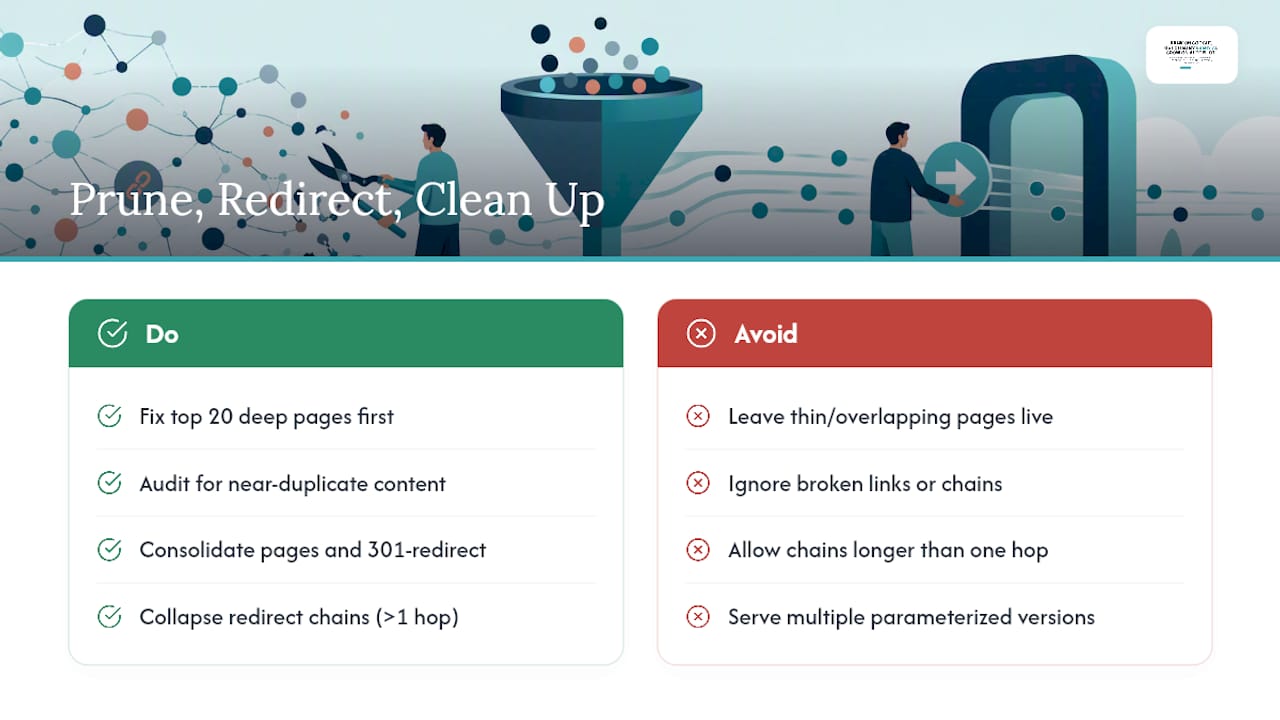
Thin, overlapping pages with little unique value are quietly adding depth and diluting crawl budget. Audit for near-duplicate content and either consolidate into one strong page with a 301 redirect, or remove pages outright with a 410 if they no longer serve any purpose.
Broken links and redirect chains deserve equal attention. Redirect chains and broken links increase effective crawl depth and frequently create orphan pages, which wastes crawler time that could go toward pages you actually want indexed. Run a redirect audit alongside your depth crawl and collapse any chain longer than one hop. While you’re at it, canonicalize parameterized URLs (sort options, tracking parameters, session IDs) so you’re not asking Google to crawl five versions of the same page.
Pro Tip: Fix your top 20 highest-value deep pages before touching anything else. A partial fix on the pages that matter beats a perfect fix on pages nobody visits.
What Tools and Workflow Actually Reduce Crawl Depth?
You need three categories of tooling working together: a crawler, a real-world data source, and a speed check.
Start with a crawler like Screaming Frog or Sitebulb and export three data points for every URL: crawl depth, inlink count, and orphan status. These numbers form the backbone of every decision you’ll make in this process. Screaming Frog’s crawl depth report and Sitebulb’s visualized site structure map both make it easy to spot pages sitting six or seven clicks out.
Crawl tools tell you what’s structurally possible. Google Search Console tells you what’s actually happening. Pull the index coverage report to see which URLs Google has indexed, excluded, or flagged as “discovered, not currently indexed,” a status that often correlates directly with excessive depth. Cross-reference this against the crawl stats report, which shows total crawl requests over time. If crawl requests are flat or declining while your site is growing, that’s a signal your architecture is choking crawler access.
Site speed matters more here than most people assume. A slow server response time limits how many pages Googlebot can fetch in a single crawl session, which means even a well-structured site with a good linking pattern can suffer if pages take three or four seconds to render. Run your priority pages through Lighthouse or PageSpeed Insights and fix render-blocking issues before assuming your linking structure is the only culprit. Our site speed guide covers the specific fixes that move the needle fastest.
The workflow that ties all of this together is straightforward:
- Baseline crawl to capture current depth distribution.
- Prioritize fixes by business value, not by depth alone.
- Implement hub pages, contextual links, sitemap updates, and pruning.
- Recrawl and compare the new depth distribution against your baseline.
- Monitor Search Console and server logs for changes in crawl behavior over the following weeks.
How Do You Know the Fixes Worked?
Recrawl your site and compare the new depth distribution against the baseline you captured before making changes. The percentage of pages sitting at depth 1 through 4 should climb, and your previously flagged priority pages should show a measurably shorter path.
Watch these four signals over the following month:
- Crawl frequency in Search Console. Increased crawl frequency and improved index status for previously deep pages are the clearest signs your fixes worked.
- Index coverage status changes. Pages that were stuck in “discovered, not indexed” should start moving to “indexed” as crawlers revisit them more often.
- Server log confirmation. Log files or a hosted log analysis tool will show you exactly when Googlebot visited a given URL and how often, which is more reliable than inference from Search Console alone.
- Recurring audit cadence. Schedule a monthly technical crawl and keep a running list of priority URLs you check every time, so a regression doesn’t sit unnoticed for a full quarter.
A technical SEO audit checklist built around these checkpoints keeps this from becoming a one-time project that quietly decays.
Handling Faceted Navigation and Large, Messy Sites
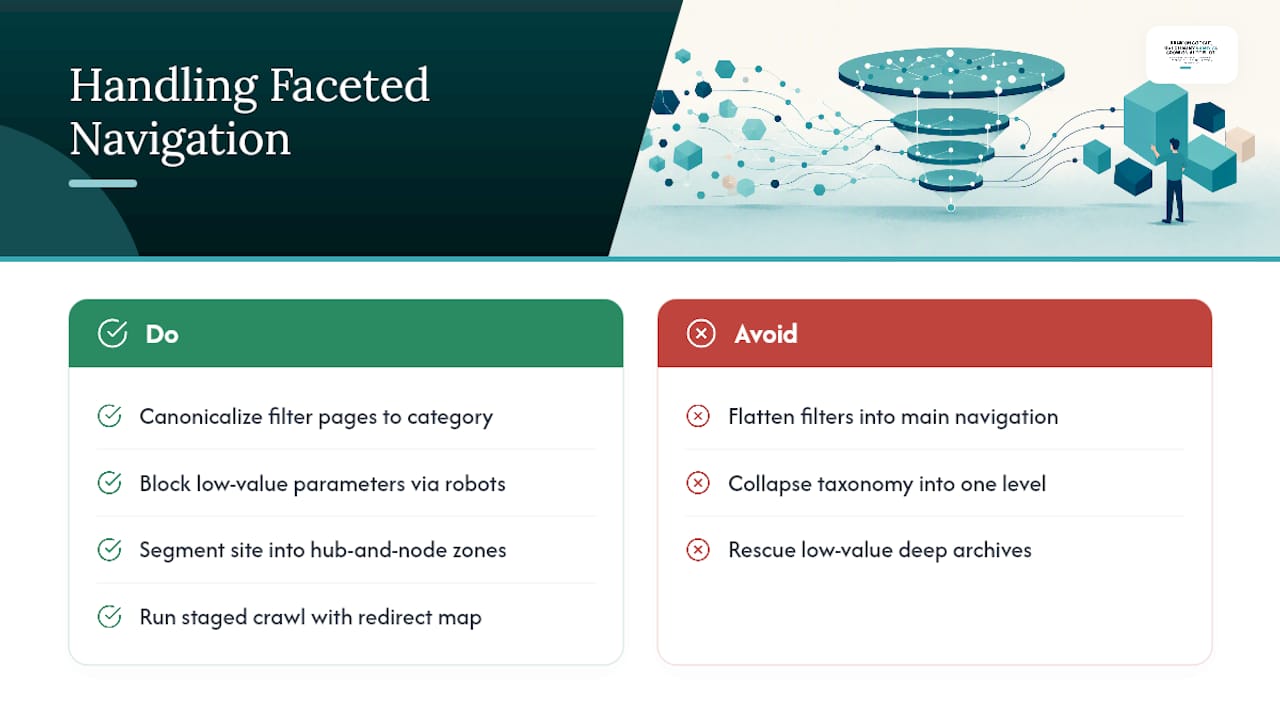
Faceted navigation and filter combinations are the fastest way to generate thousands of near-duplicate URLs, and these parameter combinations are a well-documented crawl trap. Don’t try to flatten every filtered URL into the main navigation. Instead, canonicalize filter pages back to their parent category, restrict crawler access to low-value parameter combinations through robots directives, or handle filtering client-side so it doesn’t generate indexable URLs at all.
For very large sites, resist the urge to flatten your entire taxonomy into one shallow layer. That approach often destroys the topical signals search engines use to understand your site. Segment instead into hub-and-node zones, where each topic cluster has its own shallow internal structure without collapsing the whole site into a flat pile of unrelated pages.
Any CMS migration or taxonomy overhaul needs a redirect map and a staged crawl before launch, not after. And some depth is fine to accept. Old archives and low-value product variants don’t need rescuing just because they’re technically deep.
Pro Tip: Before restructuring a faceted navigation system, crawl it in isolation first. You’ll often find the parameter sprawl is coming from two or three filter types, not the whole system.
What Does Ongoing Crawl-Depth Prevention Look Like?
Preventing depth creep takes a repeatable cadence, not a one-time cleanup. A weekly technical audit checking schema completeness, llms.txt readiness, page speed, and internal linking depth catches problems before they compound. Pairing that with a steady publishing rhythm, where new content gets built as hub pages linking into existing clusters rather than as orphaned one-offs, keeps average depth compressed as a site grows. Stellor runs both of these as standard: weekly audits across eleven technical checks, plus 30 articles a month structured around hub-and-cluster architecture from the start.
The Three Fixes I’d Start With
If you only have a week, start here: identify your highest-value deep pages using traffic and conversion data, add contextual links from your top-performing pages down to them, then update and resubmit your sitemap. Skip the temptation to flatten the entire site or cram new links into navigation. That creates bloat and confuses users more than it helps crawlers. Depth problems are usually fixed with precision, not demolition.
— Cole
Fix Crawl Depth Once, Then Stop Thinking About It Weekly
Most teams treat crawl depth as a one-off audit project, then watch it drift back within two quarters as new pages get published without a linking plan. Stellor builds the fix into the publishing process itself: every one of the 30 articles it produces each month is placed into a hub structure from day one, backed by a 4,000-site backlink network that reinforces the pages that matter most.

Weekly technical audits catch depth regressions, broken links, and redirect chains before they pile up, and LLM visibility tracking across ChatGPT, Claude, Perplexity, and Gemini shows whether your fixes are translating into actual citations, not just cleaner crawl reports. If your architecture needs deeper technical work than content alone can fix, a partner like 121 Groups technical SEO team can handle crawl and render diagnostics at the agency level. Start a 3-day free trial of Stellor, no card required, and see your current crawl-depth distribution mapped out inside your first audit.
Sources
- Reduce Crawl Depth: Faster Indexing Playbook (2026)
- Crawl Depth: 10-Point Guide for SEOs
- Crawl Depth in SEO: How to Increase Crawl Efficiency
- How to Fix Crawl Depth Issues in SEO | AAMAX
FAQ
What Does Crawl Depth Mean?
Crawl depth is the number of clicks a page sits from your homepage, following your site’s internal link structure. Pages that require 4 to 6 or more clicks to reach tend to get crawled less often, which can delay indexing and hurt visibility.
What Is the Best Practice for Page Crawl Depth?
Keep your highest-priority pages within 1 to 4 clicks of the homepage, and treat anything past depth 5 as worth reviewing. A flat, well-linked architecture with consistent internal links is the most reliable way to hit that range across an entire site.
How Often Do Google Bots Crawl a Site?
Crawl frequency varies by site size, update frequency, and server response speed, and Google adjusts it dynamically based on how often your content changes. Checking Search Console’s crawl stats report is the most direct way to see your site’s actual crawl frequency rather than relying on general assumptions.
How Do I Stop Web Crawlers From Accessing Certain Pages?
Use robots.txt to block crawler access to low-value sections, or apply a noindex meta tag to pages you want crawled but excluded from search results. For parameter-heavy or faceted URLs specifically, canonical tags combined with parameter handling often work better than a blanket block, since they consolidate signals instead of just hiding pages.
Can Sitemaps Alone Fix Crawl Depth Problems?
No. Sitemaps help Google discover pages, but they can’t replace internal linking as the signal that determines crawl priority. A page listed in your sitemap but buried six clicks deep with no contextual links pointing to it will still get crawled infrequently.
Does Stellor Help With Crawl Depth Issues?
Stellor’s weekly technical audits check internal linking depth as one of eleven standard checks, and its content cadence builds new pages into hub structures instead of publishing them as orphans. Pricing and trial details are available on the Stellor product page.