

TL;DR:
- LocalBusiness schema uses structured data to improve local search rankings and AI citations. Including specific subtypes and complete, consistent information helps search engines and AI answer engines verify your business details accurately. Regular validation and updates ensure your schema remains effective in generating visibility and citations.
LocalBusiness schema is structured data markup that tells search engines and AI answer engines exactly what your business is, where it operates, and what it offers. Defined by the Schema.org vocabulary and deployed as JSON-LD code, it is the technical foundation of local search visibility. When you use specific LocalBusiness schema examples correctly, Google can display your business in the local map pack, and AI engines like ChatGPT, Perplexity, and Gemini can cite you confidently when buyers ask for recommendations near them.
What are the essential LocalBusiness schema examples and properties?
The four mandatory fields for any LocalBusiness schema markup are @type, name, address, and telephone. Missing any one of these fields excludes your business from local pack eligibility and AI citation. That is not a risk worth taking.
Your address field must include streetAddress, addressLocality, postalCode, and addressCountry. A phone number in telephone should match your Google Business Profile exactly. These two fields alone tell search engines and AI systems whether your business is real and locatable.
Beyond the mandatory four, recommended properties like geo, openingHoursSpecification, priceRange, image, url, sameAs, and aggregateRating significantly boost AI visibility. Each additional property gives AI engines more verified data points to cite with confidence.
| Property | Status | What it does |
|---|---|---|
@type |
Required | Identifies the specific business subtype |
name |
Required | Business name, must match all listings |
address |
Required | Full postal address with all subfields |
telephone |
Required | Primary contact number |
geo |
Recommended | Precise latitude and longitude coordinates |
openingHoursSpecification |
Recommended | Structured hours by day and time |
priceRange |
Recommended | Relative cost indicator (e.g., “$$”) |
sameAs |
Recommended | Links to authoritative directory profiles |
aggregateRating |
Recommended | Average review score and count |
Pro Tip: Add sameAs links pointing to your Google Business Profile, Yelp, and Facebook pages. These cross-references help AI engines verify your business identity and raise citation confidence.
Why does choosing the right schema subtype matter?
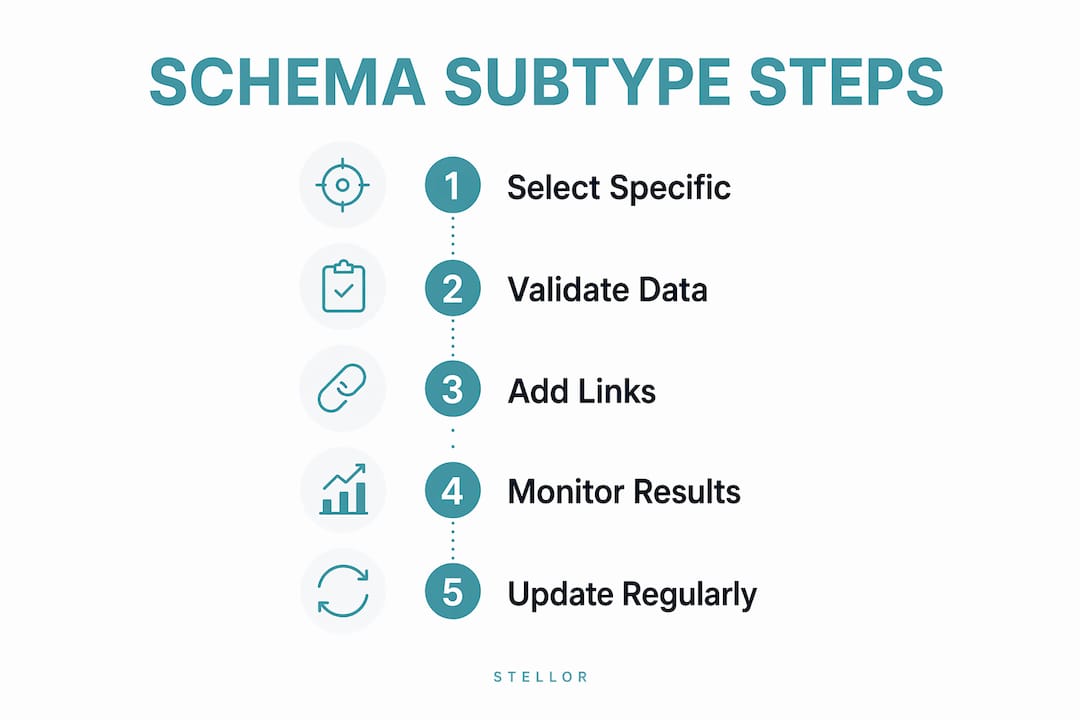
Over 200 specific subtypes exist within Schema.org, and using the generic LocalBusiness type when a more specific one applies directly harms your rich result performance. Specificity is not optional. It is the single biggest lever you control in structured data for local businesses.

Each subtype unlocks properties that the generic type does not support. A Restaurant can include servesCuisine, hasMenu, and acceptsReservations. A Dentist supports medicalSpecialty. A Hotel supports amenityFeature and checkinTime. These subtype-specific fields give AI engines the exact details they need to answer buyer questions accurately.
Popular subtypes and their most impactful added properties:
- Restaurant:
servesCuisine,hasMenu,acceptsReservations,starRating - Dentist / Physician:
medicalSpecialty,availableService,healthPlanNetworkId - Plumber / Electrician / HVAC:
areaServed,availableService,hasOfferCatalog - Hotel / LodgingBusiness:
amenityFeature,checkinTime,checkoutTime,numberOfRooms - AutoRepair:
availableService,paymentAccepted,currenciesAccepted - LegalService / Attorney:
areaServed,availableService,legalName
Pro Tip: Search “Schema.org [your business type]” directly on schema.org to see every supported property for your subtype. Spend 10 minutes there before writing a single line of code.
Practical JSON-LD LocalBusiness schema examples
JSON-LD is the format Google recommends for all structured data, and it belongs inside a <script type="application/ld+json"> tag. You can place it in the <head> section or just before the closing </body> tag. Either placement works.
Restaurant example
{
  "@context": "https://schema.org",
  "@type": "Restaurant",
  "name": "The Harbor Grill",
  "address": {
    "@type": "PostalAddress",
    "streetAddress": "142 Bayfront Drive",
    "addressLocality": "San Diego",
    "addressRegion": "CA",
    "postalCode": "92101",
    "addressCountry": "US"
  },
  "telephone": "+16195550182",
  "geo": {
    "@type": "GeoCoordinates",
    "latitude": 32.7157,
    "longitude": -117.1611
  },
  "servesCuisine": "Seafood",
  "priceRange": "$$",
  "url": "https://www.theharborgrillsd.com",
  "openingHoursSpecification": [
    {
      "@type": "OpeningHoursSpecification",
      "dayOfWeek": ["Monday","Tuesday","Wednesday","Thursday","Friday"],
      "opens": "11:00",
      "closes": "22:00"
    },
    {
      "@type": "OpeningHoursSpecification",
      "dayOfWeek": ["Saturday","Sunday"],
      "opens": "10:00",
      "closes": "23:00"
    }
  ],
  "aggregateRating": {
    "@type": "AggregateRating",
    "ratingValue": "4.6",
    "reviewCount": "312"
  },
  "sameAs": [
    "https://www.google.com/maps/place/the-harbor-grill",
    "https://www.yelp.com/biz/the-harbor-grill-san-diego"
  ]
}
Dentist example
{
  "@context": "https://schema.org",
  "@type": "Dentist",
  "name": "Bright Smiles Family Dentistry",
  "address": {
    "@type": "PostalAddress",
    "streetAddress": "88 Maple Avenue",
    "addressLocality": "Austin",
    "addressRegion": "TX",
    "postalCode": "78701",
    "addressCountry": "US"
  },
  "telephone": "+15125550344",
  "medicalSpecialty": "Dentistry",
  "url": "https://www.brightsmilesdentistry.com",
  "geo": {
    "@type": "GeoCoordinates",
    "latitude": 30.2672,
    "longitude": -97.7431
  },
  "sameAs": [
    "https://www.healthgrades.com/dentist/bright-smiles",
    "https://www.yelp.com/biz/bright-smiles-austin"
  ]
}
Service-area business example (Plumber)
For businesses that travel to customers rather than receiving them at a fixed location, use areaServed with a GeoCircle or AdministrativeArea. Defining service area boundaries with areaServed prevents AI from citing your business for jobs outside your actual coverage zone.
{
  "@context": "https://schema.org",
  "@type": "Plumber",
  "name": "FastFlow Plumbing",
  "address": {
    "@type": "PostalAddress",
    "streetAddress": "310 Industrial Blvd",
    "addressLocality": "Denver",
    "addressRegion": "CO",
    "postalCode": "80203",
    "addressCountry": "US"
  },
  "telephone": "+13035550291",
  "areaServed": {
    "@type": "GeoCircle",
    "geoMidpoint": {
      "@type": "GeoCoordinates",
      "latitude": 39.7392,
      "longitude": -104.9903
    },
    "geoRadius": "25000"
  },
  "url": "https://www.fastflowplumbing.com"
}
For home services businesses looking to build on these examples, the service business automation guide covers additional operational best practices that pair well with solid schema foundations.
What are the most common LocalBusiness schema mistakes?
Schema errors are more common than most business owners realize, and they directly reduce your chances of appearing in local packs and AI answers. The good news is that each mistake has a clear fix.
-
Using generic
LocalBusinessinstead of a specific subtype. This is the most damaging error. Switch to the most specific subtype that accurately describes your business. -
Inconsistent NAP data. Your schema name must match your Google Business Profile, Yelp, and Facebook listings exactly. Even small differences like “LLC” vs. no suffix confuse AI engines and lower citation rates.
-
Omitting
geocoordinates or using imprecise values. GeoCoordinates precise to at least 4 decimal places are critical for AI proximity calculations. Without them, AI systems fall back on less reliable address matching. -
Leaving outdated hours in
openingHoursSpecification. Incorrect or outdated schema hours reduce trust from both AI and search engines. Update this field any time your hours change, including holidays. -
Missing
sameAslinks. These links connect your schema to verified directory profiles. Without them, AI engines have fewer cross-references to confirm your business is legitimate. -
Skipping validation after implementation. Use the Google Rich Results Test to catch errors before they cost you rankings. Paste your page URL or code directly into the tool.
Pro Tip: After validating with the Google Rich Results Test, monitor your actual local pack and AI snippet appearances over 2–4 weeks. Validation clears errors, but real visibility in search results is the true success metric.
Reviewing your full technical setup alongside schema is worth the time. An SEO audit checklist built for local service businesses covers schema alongside page speed, mobile readiness, and internal linking.
Key Takeaways
Correct LocalBusiness schema markup, built with the most specific Schema.org subtype and consistent NAP data, is the fastest technical change a local business can make to improve both Google local pack rankings and AI citation rates.
| Point | Details |
|---|---|
| Use specific subtypes | Replace generic LocalBusiness with the most precise Schema.org subtype to unlock richer properties. |
| Four fields are mandatory | @type, name, address, and telephone must be present or your business is excluded from rich results. |
| Match NAP across all platforms | Your schema name must match Google Business Profile, Yelp, and Facebook listings exactly. |
| Add geo coordinates | Include latitude and longitude to at least 4 decimal places for accurate AI proximity matching. |
| Validate and monitor | Use the Google Rich Results Test, then track local pack and AI snippet appearances over 2–4 weeks. |
Schema is the plumbing behind your local visibility
I have reviewed hundreds of local business websites, and the pattern is consistent. Businesses that rank well in local packs and get cited by AI engines are not always the ones with the best content or the most backlinks. They are the ones whose structured data is specific, complete, and consistent everywhere it appears.
The subtype choice surprises most business owners. I have seen a general contractor switch from LocalBusiness to GeneralContractor and pick up three local pack positions within three weeks. No new content. No new links. Just a more specific @type value and a few added properties. That is the kind of return that makes schema worth prioritizing before almost anything else.
Multi-location businesses have an additional layer to manage. Each location needs its own LocalBusiness schema instance. Linking each location to a parent Organization schema via parentOrganization tells search engines and AI systems that these locations belong to the same brand. Without that link, each location competes as an independent entity with no brand authority behind it.
The maintenance side is where most businesses fall short. Schema is not a one-time task. Hours change, services expand, ratings update. A business that set its schema in 2023 and never touched it is likely showing outdated information to both Google and AI engines right now. Build a quarterly schema review into your calendar. It takes 20 minutes and protects everything else you have built.
For businesses serious about local SEO for service businesses, schema is the foundation. Everything built on top of it, content, backlinks, reviews, compounds faster when the foundation is solid.
— Cole
Trystellor handles schema so you can focus on your business
Getting schema right is one piece of a larger local SEO picture. Trystellor is a GEO + SEO platform built for local businesses that need to rank on Google and get cited by AI engines like ChatGPT, Claude, Perplexity, and Gemini. For $199 per month, it replaces five separate tools with one platform: 30 SEO-optimized articles per month, a 4,000-site backlink network, weekly technical audits covering schema completeness and structured data integrity, daily Reddit opportunities, and LLM visibility tracking across all major AI engines.

Every article Trystellor publishes includes correct schema markup, internal linking, and llms.txt configuration out of the box. You can explore the full platform features or start a three-day free trial with no credit card required at trystellor.com. Your free AI Visibility Audit arrives within 48 hours and shows exactly which AI prompts your business is winning and which ones it is missing.
FAQ
What is LocalBusiness schema markup?
LocalBusiness schema markup is structured data code, written in JSON-LD format, that describes your business to search engines and AI answer engines. It uses the Schema.org vocabulary to define your business type, location, hours, and contact details.
Which JSON-LD fields are required for LocalBusiness schema?
The four required fields are @type, name, address (with streetAddress, addressLocality, postalCode, and addressCountry), and telephone. Missing any of these excludes your business from local pack eligibility.
How do I choose the right Schema.org subtype?
Select the most specific subtype that accurately describes your business, such as Restaurant, Dentist, Plumber, or AutoRepair. Using a specific subtype instead of the generic LocalBusiness type unlocks additional properties and improves rich result eligibility.
How do I validate my LocalBusiness schema?
Paste your page URL or raw JSON-LD code into the Google Rich Results Test to check for errors and warnings. After fixing any issues, monitor your actual local pack and AI snippet appearances over 2–4 weeks to confirm the markup is working.
Does LocalBusiness schema help with AI answer engines?
Yes. AI engines like ChatGPT, Perplexity, and Gemini read structured data to verify business details before citing them in answers. Complete schema with accurate geo coordinates, sameAs links, and openingHoursSpecification gives AI engines the verified data they need to recommend your business with confidence.