
Getting more calls from Google searches comes down to three things done well: a complete Google Business Profile, a website built for mobile callers, and Google Ads campaigns structured around call actions. Businesses that nail all three consistently outperform competitors who treat phone calls as an afterthought. The strategies below are ranked by impact and built for local service businesses that need the phone to ring, not just the traffic to show up.
- Google Business Profile is the single highest-leverage asset for local call volume
- Google Ads call extensions and call-only campaigns produce fast, measurable results
- Click-to-call website optimization converts existing traffic into calls at no extra ad spend
- Call tracking tells you exactly which channels are worth your budget
- Google Maps visibility drives a significant share of local clicks and calls
A verified local business profile that is fully optimized can generate an average of 50 monthly calls, 12% more than incomplete profiles, and appear in 80% more searches.
Table of Contents
- 1. How your Google Business Profile drives more phone calls
- 2. How Google Ads call features increase your inbound call volume
- 3. How to turn your website into a call-generating machine
- 4. How call tracking reveals which strategies actually work
- 5. How Google Maps marketing puts your business in front of local callers
- 6. How an AI-powered GEO + SEO platform amplifies your call volume
- Key Takeaways
- More calls, less manual work with Trystellor
- FAQ
1. How your Google Business Profile drives more phone calls
Your Google Business Profile (GBP) is the plumbing behind the walls of your local digital presence. When someone searches “plumber near me” or “HVAC repair in Denver,” Google pulls your GBP data to decide whether you show up in the Local Map Pack. A sparse or outdated profile loses that decision before the searcher ever sees your name.
Fill every section completely. Business name, address, phone number, hours, primary and secondary categories, service list, and business description all feed Google’s relevance signals. Your primary category carries the most weight, so choose the one that reflects your core revenue driver, not a broad catch-all.
NAP consistency is non-negotiable. Your Name, Address, and Phone number must match exactly across your website, Google Business Profile, Yelp, Facebook, and every directory where your business appears. Even a minor discrepancy, like “St.” versus “Street,” can erode Google’s confidence in your listing and suppress your local search rankings.
Post weekly on Google Posts. Weekly Google Posts increase profile views by up to five times and signal activity to Google’s algorithm. Each post should include a clear call-to-action button, whether that’s “Call Now,” “Book Online,” or “Get a Quote.” Think of it as a free ad unit that lives directly on your profile.
Photos matter more than most owners realize. Authentic daily photos, including team shots, completed jobs, and before-and-after images, signal legitimacy to Google and drive substantially more calls than stock imagery. Aim for consistent uploads rather than a one-time batch.
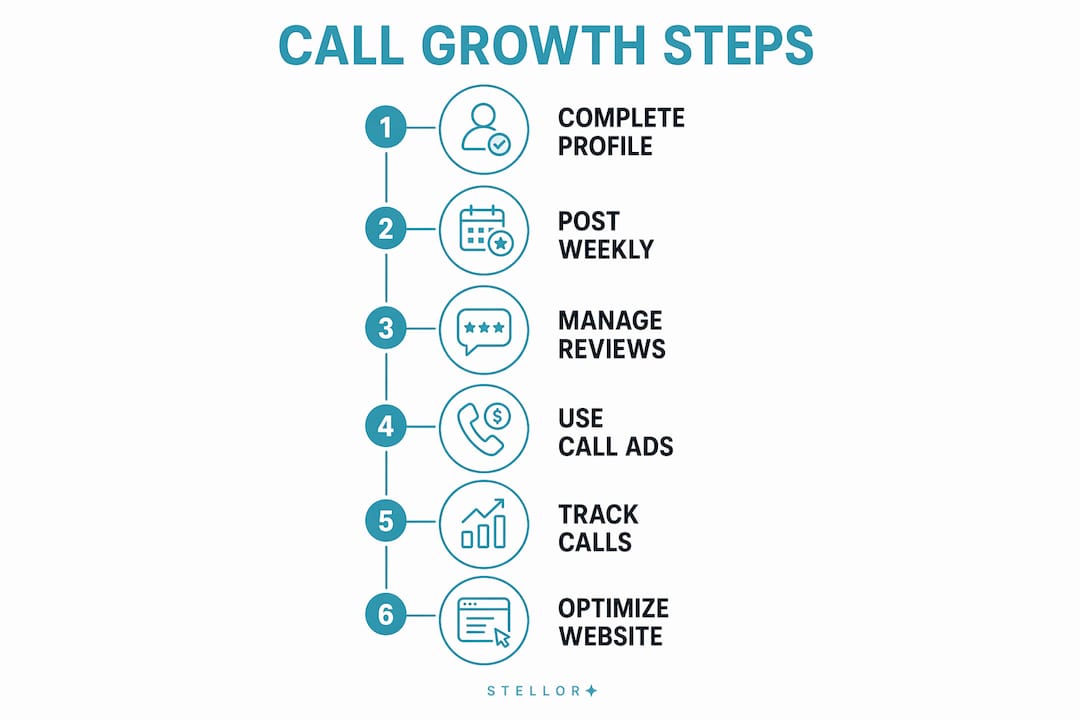
Manage reviews actively. Responding to reviews within 48 hours improves impressions and local rankings. When you reply, naturally weave in your service areas and core offerings. Google indexes review text, so a response that mentions “roof repair in Austin” reinforces your relevance for exactly those searches.
| GBP Element | Why It Drives Calls | Action to Take |
|---|---|---|
| Complete business info | Increases match rate for relevant searches | Fill every field, including services and description |
| NAP consistency | Builds Google’s trust in your listing | Audit all directories quarterly |
| Weekly Google Posts | Signals activity, boosts profile views | Schedule posts every Monday with a call-to-action |
| Authentic photos | Signals legitimacy, increases engagement | Upload new photos weekly |
| Review responses | Improves rankings and social proof | Reply to every review within 48 hours |
| Q&A section | Answers pre-call objections | Seed several common questions with clear answers |
Pro Tip: Use a unique call tracking number on your GBP that differs from your main website number. This gives you precise attribution for calls that originate specifically from your profile, so you know exactly how much volume your GBP is generating versus other channels.
For a deeper look at profile tactics, the GBP optimization guide for service businesses covers the exact fields and posting cadences that move the needle.
2. How Google Ads call features increase your inbound call volume
Google Ads gives you two direct tools for generating phone calls: call assets (formerly call extensions) and call-only campaigns. Both are worth running, but they serve different moments in the buyer’s journey.

Call assets attach a clickable phone number to your existing search ads. A searcher sees your ad, spots the phone number directly in the result, and taps to call without visiting your website. Google Ads call assets and call-only campaigns are especially effective on mobile, where the friction of navigating a website often kills the conversion.
Call-only campaigns go further. The entire ad is built around one action: calling you. There is no headline link to a landing page. The ad displays your phone number, business name, and a short description, and the only click available is a call. These campaigns work best for services where buyers want immediate answers, like emergency plumbing, locksmith services, or same-day HVAC repair.
- Schedule ads to run only during your business hours. Paying for calls you cannot answer wastes budget and frustrates potential customers.
- Set a minimum call duration threshold in your conversion tracking, typically 60–90 seconds, to filter out wrong numbers and short hangups from your conversion data.
- Analyze call reports weekly to identify which keywords and ad groups generate the longest, highest-quality calls, then shift budget toward them.
- Optimize your landing pages for callers who do visit your site: phone number in the header, a sticky click-to-call button on mobile, and a clear value proposition above the fold.
Pro Tip: Run the same promotional offer in your Google Ads and your Google Posts simultaneously. Consistent messaging across both channels reinforces trust and increases the likelihood a searcher calls rather than continuing to browse.
Google’s own guidance on driving more calls with call ads is worth bookmarking. It covers bidding strategy, scheduling, and conversion tracking setup in detail.
3. How to turn your website into a call-generating machine
Your website is where organic search traffic lands, and most of it arrives on a smartphone. 40% of local business websites still display phone numbers as plain text, which means a mobile visitor has to manually dial rather than tap to call. That friction kills conversions.
Make every phone number a tap-to-call link. Use the tel: protocol in your HTML so that any phone number on your site initiates a call when tapped on mobile. This single change costs nothing and immediately removes a barrier between the searcher and your phone.
Add a sticky call button on mobile. A floating button anchored to the bottom of the screen stays visible as users scroll through your service pages. It removes the need to hunt for contact information and captures callers at the moment of peak intent.
Build local landing pages for each service area. A page titled “Water Heater Repair in Colorado Springs” ranks for that specific query and speaks directly to the searcher’s location. These pages, combined with consistent NAP data, are how you get calls from local SEO without relying entirely on paid ads. For HVAC contractors and similar trades, sourcing local talent and building location-specific pages go hand in hand as your call volume grows.
Implement Schema.org local business markup. Structured data tells Google exactly who you are, where you are, what you do, and how to reach you. The LocalBusiness schema type, combined with the telephone property, feeds your phone number directly to search crawlers. When Google can verify your information with certainty, it is far more likely to surface your business in competitive local results. The Schema.org documentation covers every property you need.
- Add FAQ schema to pages that answer common pre-call questions, like pricing, service areas, and availability.
- Keep page load speed under three seconds on mobile. Slow pages lose callers before they ever see your number.
- Use call scheduling and routing tools integrated into your site so callers reach the right person immediately, reducing abandonment.
Pro Tip: Place your phone number in both the header and the footer of every page. Desktop visitors often scroll to the footer for contact details, while mobile visitors expect it at the top. Covering both positions captures callers regardless of how they navigate.
4. How call tracking reveals which strategies actually work
You cannot improve what you do not measure. Call tracking assigns unique phone numbers to each marketing channel, so you know whether a call came from your Google Business Profile, a paid search ad, an organic landing page, or a local directory listing. Without it, you are guessing.

Assign unique tracking numbers by channel. One number for your GBP, one for Google Ads, one for organic search, one for your website footer. When a call comes in, the tracking platform logs which number was dialed, giving you precise attribution across every source.
Integrate call data with Google Analytics and your CRM. Connecting call data to Google Analytics or a CRM platform gives you a complete picture of the customer journey, from the keyword that triggered the search to the call that booked the job. This is how you identify which pages and campaigns are generating revenue, not just traffic.
| Metric to Track | What It Tells You | Tool to Use |
|---|---|---|
| Call volume by channel | Which sources drive the most calls | Call tracking platform + UTM parameters |
| Average call duration | Whether calls are quality leads or wrong numbers | Call tracking platform |
| Call time of day | When to schedule ads and staff | Google Ads call reports |
| Missed call rate | Whether you are losing leads after they find you | Call tracking platform |
| Keyword-to-call path | Which search terms drive actual revenue | Google Ads + call tracking integration |
- Set a minimum call duration filter (60–90 seconds) in Google Ads conversion tracking to count only genuine leads.
- Review call recordings or transcripts weekly to identify common objections, questions, and missed opportunities.
- Adjust ad scheduling based on peak call times. If 70% of your calls arrive between 8 AM and noon, concentrate your budget there.
- Use missed call data to identify staffing gaps and reduce the number of leads lost to unanswered phones.
5. How Google Maps marketing puts your business in front of local callers
The Google Map Pack drives roughly 42% of all clicks on local searches, often outperforming paid ads for phone call generation. Appearing in those top three map results is one of the highest-return moves in local SEO.
Google ranks Map Pack results on three factors: relevance (how well your profile matches the search), distance (how close you are to the searcher), and prominence (how well-known and trusted your business appears online). You cannot control distance, but you can control the other two.
- Complete every section of your GBP to maximize relevance signals.
- Build local citations on authoritative directories like Yelp, Angi, and the Better Business Bureau. Consistent NAP data across these platforms reinforces Google’s confidence in your listing.
- Accumulate reviews steadily. Review velocity, meaning a consistent flow of new reviews over time, carries more weight than a single burst of 50 reviews followed by silence.
- Add fresh photos and Google Posts with call-to-action language directly visible on your Maps listing.
- Implement local business schema markup on your website to reinforce the location signals your GBP sends.
- Consider Google Maps Ads (Local Search Ads) for competitive markets where organic Map Pack placement is difficult to win quickly.
For service businesses like auto shops and home services providers, a well-maintained Maps presence often generates more calls than any other single channel. The auto shop GBP guide shows exactly how service providers build this kind of local visibility.
6. How an AI-powered GEO + SEO platform amplifies your call volume
Ranking on Google and getting cited by AI answer engines like ChatGPT and Perplexity are no longer separate goals. Buyers now search on Google, cross-check on Perplexity, and ask ChatGPT for recommendations, often before they ever dial a number. Businesses that show up consistently across all of those surfaces get more calls.
Trystellor is built for exactly this reality. It replaces five separate tools, including a content platform, backlink service, technical SEO auditor, community engagement workflow, and AI visibility tracker, with one subscription at $199 per month.
- Content at scale: Trystellor publishes 30 GEO and SEO-optimized articles per month to your CMS, each targeting a specific buyer query with schema markup and internal linking built in. This is how you build the topical authority that drives both Google rankings and AI citations.
- Backlink network: A 4,000-site backlink network builds the authority signals that search engines and LLMs use to gauge trust, without manual outreach or the risks of low-quality link schemes.
- Weekly technical audits: Eleven checks cover schema completeness, page speed, mobile responsiveness, and llms.txt readiness. Issues surface with one-click fixes.
- Reddit engagement: AI engines, particularly ChatGPT, draw heavily from Reddit when generating service recommendations. Trystellor identifies high-intent threads and drafts authentic reply suggestions so your business appears in the communities LLMs are quoting.
- LLM visibility tracking: Every week, the platform queries ChatGPT, Claude, Perplexity, and Gemini using the prompts your buyers actually use and reports back exactly where your business is mentioned and where competitors are winning instead.
Pro Tip: Use AI-driven recommendations from your LLM visibility reports to update your GBP description and website content. When you know which prompts are generating citations for competitors, you can adjust your content to answer those same questions more directly.
For a deeper look at how AI search is reshaping local discovery, the LLM SEO guide for 2026 covers the citation mechanics that matter most right now.
Key Takeaways
A fully optimized Google Business Profile, combined with call-focused Google Ads campaigns and a mobile-ready website, is the most reliable path to increasing phone calls from Google searches.
| Point | Details |
|---|---|
| Google Business Profile first | A complete, active GBP can generate an average of 50 monthly calls, 12% more than incomplete profiles, and appear in 80% more searches. |
| Google Ads call campaigns | Use call assets and call-only campaigns scheduled during business hours to avoid wasted spend on missed calls. |
| Mobile click-to-call | Convert tel: links and sticky call buttons on mobile; 40% of local sites still use plain-text numbers. |
| Call tracking by channel | Assign unique numbers per source to identify which keywords, pages, and ads drive actual revenue. |
| Trystellor for sustained growth | Trystellor automates 30 articles/month, backlinks, technical audits, and LLM tracking from $199/month. |
More calls, less manual work with Trystellor
Running a Google Business Profile, managing Google Ads, publishing local content, building backlinks, and tracking calls across every channel is a full-time job on top of running your actual business. Most local service owners do some of these well and let the rest slide, which is exactly where call volume leaks.

Trystellor handles the entire stack in one place. The platform publishes 30 location and service-specific articles to your site every month, runs weekly technical audits with one-click fixes, builds authority through a 4,000-site backlink network, and tracks your visibility across Google, ChatGPT, Claude, Perplexity, and Gemini every week. You see exactly which AI prompts your competitors are winning and which ones you should be earning. The local SEO for service businesses guide shows the kind of compounding results this approach produces over a single quarter.
Pricing starts at $199 per month with a three-day free trial and no credit card required. Every article Trystellor publishes stays yours, even if you cancel. Start your free trial at trystellor.com/product and get your AI Visibility Audit within 48 hours.
FAQ
How long does it take to get more calls from Google after optimizing my profile?
Initial improvements often appear within two to four weeks of fully completing your Google Business Profile and correcting directory inconsistencies. Sustained increases in call volume typically take three to six months as your local authority and review count build.
How do I get calls from Google Ads without wasting budget?
Use call-only campaigns or call assets scheduled during your business hours, set a minimum call duration threshold in your conversion tracking to filter out non-leads, and review call reports weekly to shift budget toward the keywords generating the longest calls.
Is there a limit to how many calls Google can generate for my business?
Google does not cap call volume, but your visibility is constrained by your Map Pack ranking, ad budget, and profile completeness. Businesses that rank in the top three Map Pack positions and run active call campaigns consistently see the highest call volumes.
How do I reach more people on Google search to increase calls?
Combine a complete GBP with local landing pages targeting specific service areas, consistent NAP data across directories, and Schema.org local business markup on your website. This three-layer approach covers organic search, Maps, and rich results simultaneously.
Why am I getting website traffic but no phone calls?
The most common cause is a conversion bottleneck: phone numbers displayed as plain text instead of tap-to-call links, no sticky call button on mobile, or landing pages that fail to build immediate trust. Fix the tel: links first; it costs nothing and often produces an immediate lift.