

FAQ schema uses the Schema JSON-LD model, and the examples below follow that pattern exactly, including the mainEntity, Question, and acceptedAnswer properties Google’s crawlers expect. Every block here is valid and ready to adapt for your own pages. Test each one with Validator before you ship it, and confirm the rendered HTML matches in Google Search Console.
TL;DR:
- Most FAQ schema implementations should be embedded directly into the page’s HTML, preferably as a single JSON-LD script, to ensure search engines can parse it accurately.
- Validate your JSON-LD with schema.org’s validator and verify rendering in Search Console to prevent common errors like mismatched content or invalid syntax.
- Keep FAQ questions between three and ten, focusing on real user inquiries, and ensure answers match the visible copy exactly for best search visibility.
- Avoid adding schema for content not visible to visitors or using multiple FAQ schema blocks on one page to prevent validation errors and policy violations.
- Automating schema generation with platforms like Stellor reduces errors and maintains consistent structured data across large sites, saving time on manual updates.
Table of Contents
- What Is FAQ Schema Markup?
- FAQ Schema Examples: Basic to Advanced JSON-LD
- How Do You Implement FAQ Schema on a Page?
- Validating and Testing Your FAQ Schema
- What Breaks FAQ Schema and Violates Policy?
- FAQ Schema Best Practices for Long-Term Results
- Should FAQPage or QAPage Handle Your Questions?
- How Stellor Handles FAQ Schema at Scale
- When Should You DIY FAQ Schema vs. Use a Managed Platform?
- A Managed Path for Teams That Want Schema Handled Automatically
- Sources
- FAQ
What Is FAQ Schema Markup?
FAQ schema is a JSON-LD structure built on the FAQPage type. It tells search engines and AI crawlers that a page contains a list of questions and answers, formatted so machines can parse them without guessing at your HTML layout.
The structure follows a strict hierarchy. A FAQPage object contains a mainEntity array, and each item in that array is a Question object. Each Question needs a name property (the question text) and an acceptedAnswer property, which holds an Answer object with a text field containing the actual answer.
Here’s the required property chain, spelled out:
@context: always"https://schema.org"— tells parsers which vocabulary you’re using@type:"FAQPage"at the top level,"Question"for each item,"Answer"for each responsemainEntity: the array holding all your Question objectsname: the visible question text, exactly as it appears on the pageacceptedAnswer.text: the visible answer text, matching your on-page copy word for word
That last point matters more than most developers assume. Google’s guidance on structured data is consistent across formats: markup must reflect what a visitor actually sees on the page. If your JSON-LD answer says one thing and your visible paragraph says another, you’re not just risking a manual penalty. You’re feeding search engines and AI answer engines conflicting information about your own content.
JSON-LD is the preferred format because it’s easier to generate programmatically, easier to validate, and it doesn’t require you to wrap microdata attributes around every HTML element on the page. Microdata and RDFa both work in theory, but almost nobody uses them for FAQ markup anymore because a single <script> block is simpler to template, audit, and update at scale. If you’re publishing dozens of FAQ pages a month, JSON-LD is the only format that scales without turning into a maintenance headache.
Usage data backs up how mainstream this has become. FAQPage markup shows up on an estimated 1 million to 10 million domains tracked by schema.org’s own aggregated index. That’s not a niche tactic. It’s baseline structured data hygiene for any page answering common questions.
FAQ Schema Examples: Basic to Advanced JSON-LD
Here are five practical FAQ structured data examples, ordered from simplest to most complex. Copy any of them, swap in your own questions and answers, and validate before you deploy.
Basic single Q&A example
This is the minimal valid block. If you only have one question worth marking up, this is all you need.
{
  "@context": "https://schema.org",
  "@type": "FAQPage",
  "mainEntity": [{
    "@type": "Question",
    "name": "What is FAQ schema?",
    "acceptedAnswer": {
      "@type": "Answer",
      "text": "FAQ schema is a JSON-LD structured data format based on schema.org's FAQPage type that marks up questions and answers so search engines can display them as rich results."
    }
  }]
}
Multiple-questions example
Most real pages have several questions. You add more objects to the mainEntity array rather than creating multiple FAQPage blocks.
{
  "@context": "https://schema.org",
  "@type": "FAQPage",
  "mainEntity": [
    {
      "@type": "Question",
      "name": "How long does shipping take?",
      "acceptedAnswer": {
        "@type": "Answer",
        "text": "Standard shipping takes 3 to 5 business days within the continental United States."
      }
    },
    {
      "@type": "Question",
      "name": "Do you offer returns?",
      "acceptedAnswer": {
        "@type": "Answer",
        "text": "Yes, we accept returns within 30 days of delivery for a full refund."
      }
    }
  ]
}
HTML-in-answer example
Google allows a limited set of HTML tags inside Answer.text, including links and short lists, as long as the characters are escaped correctly inside the JSON string. This example builds one into the answer.
{
  "@type": "Question",
  "name": "What payment methods do you accept?",
  "acceptedAnswer": {
    "@type": "Answer",
    "text": "We accept Visa, Mastercard, American Express, and PayPal. See our <a href=\"https://example.com/payments\">full payment policy</a> for details."
  }
}
Notice the escaped quotation marks around the URL. Miss one of those and the whole block fails validation.
Links and rich text in answers
Bulleted lists, bold text, and inline links are technically permitted, but keep them short. A breakdown of allowed HTML in FAQ schema confirms links and basic formatting work, but heavy nesting or long lists inside a JSON string get fragile fast and are easy to break with a stray character.
Product and service page examples
A product page usually benefits from pre-purchase questions: warranty terms, sizing, compatibility, installation requirements. A service page works better with process and pricing questions: how long a job takes, what’s included, how quotes are calculated. If you run a home service business, your best FAQ candidates are usually the exact questions your dispatch team answers on the phone every day, like typical response time or whether estimates are free.
| Page type | Strong FAQ candidates |
|---|---|
| Product page | Sizing, compatibility, warranty length, return window |
| Service page | Pricing structure, scheduling, service area, licensing |
| Help center | Account setup, billing cycles, cancellation steps |
Keep the total count between 3 and 10 meaningful questions per page. Fewer than three and the markup barely adds value. More than ten and you’re likely padding the page with low-intent questions nobody actually searches for, which dilutes the signal for the good ones.
How Do You Implement FAQ Schema on a Page?
Placement and rendering matter as much as the JSON-LD itself. Here’s the sequence that avoids the most common deployment failures.
- Write the visible FAQ content first. Draft real questions and answers as normal page copy, not as an afterthought bolted on for search engines.
- Generate the JSON-LD from that same text. Copy the exact wording into your
Question.nameandAnswer.textfields so visible and structured content match precisely. - Place the script in the page
<head>or<body>. A single<script type="application/ld+json">block works in either location, as long as it renders in the final HTML the crawler sees. - Combine every Q&A into one
FAQPageblock per page. Don’t split questions across multiple schema blocks. One block, onemainEntityarray, every question on that page. - Validate the block. Run it through validator.schema.org before it ever touches production.
- Deploy and monitor. Push live, then check Search Console’s URL Inspection tool to confirm the rendered HTML includes your markup.
The trickiest part for most teams is client-side rendering. If your FAQ schema gets injected by JavaScript after page load, there’s a real risk Googlebot’s rendering pass either misses it or processes it late, especially on sites without a strong rendering budget. Server-side rendering or static prerendering removes that risk entirely, because the JSON-LD is already sitting in the HTML the first time any crawler requests the page.
Pro Tip: If your FAQ schema lives in a JavaScript-heavy component, test it with Search Console’s URL Inspection tool, not just a browser view-source. View-source shows the original HTML; URL Inspection shows what Google actually rendered, and the two are not always the same page.
Validating and Testing Your FAQ Schema
Two separate checks confirm your markup is working, and skipping either one leaves you guessing. The first checks whether your JSON-LD is syntactically correct and uses schema.org vocabulary properly. The second checks whether Google can actually see it once the page renders.
- Run validator.schema.org first. It flags missing required properties, malformed nesting, and incorrect types before you deploy anything.
- Use Search Console’s URL Inspection tool second. This confirms the structured data exists in the version of the page Google actually crawled and rendered, not just your local source file.
- Read errors and warnings differently. Errors mean the markup is invalid and likely won’t be eligible for any rich result treatment. Warnings usually mean the markup is valid but missing a recommended (not required) field, and pages often still qualify despite them.
- Recheck after any content update. If you edit the visible answer text but forget the JSON-LD, validator.schema.org won’t catch the mismatch. Only a manual side-by-side check will.
FAQPage markup validation success hinges on a single principle both schema.org and Google Search Central’s Q&A documentation agree on: the properties listed as required have to exist and have to hold real content, not placeholder text. Validators and schema.org exist to check whether your vocabulary is correct. Only rendered-HTML checks in Search Console confirm the crawler can actually reach it. You need both, not just one.
One more thing worth tracking: Google has changed how FAQ rich results display in search over the past few years, sometimes limiting the visual snippet to well-known, authoritative sites for certain query types. Eligibility and actual display are two different things. Valid markup earns eligibility. Whether Google chooses to render the rich result in the search results page is a separate, ongoing decision Google makes at the query level, and it can shift without any change on your end.
What Breaks FAQ Schema and Violates Policy?
Most FAQ schema failures come down to a short list of repeatable mistakes, and nearly all of them are avoidable with a basic pre-deploy checklist.
- Marking up content that isn’t visible. If a question and answer exist in your JSON-LD but not in the rendered page copy a visitor sees, that’s a policy violation, not just a technical error.
- Publishing multiple
FAQPageblocks on one rendered page. Combine every question into a singlemainEntityarray instead of stacking separate schema blocks, which creates validation conflicts and duplicate signals. - Invalid JSON syntax. Trailing commas, unescaped quotation marks inside strings, and JavaScript-style comments (which JSON doesn’t support at all) are the three most common ways a technically correct-looking block fails outright.
- Using FAQ schema as a keyword-stuffing vehicle. Writing ten questions that all say some version of the same thing, just to cram target keywords into
Question.namefields, is exactly the kind of manipulation this format was never meant to support. - Copying markup across pages without updating the text. A templated FAQ block that never changes per page tends to drift out of sync with whatever content actually lives on each page.
None of these mistakes are exotic. They’re the same handful of errors showing up across tutorial breakdowns of FAQ schema failures, which tells you they’re common enough to be worth a five-minute checklist before every deploy, not a rare edge case.
FAQ Schema Best Practices for Long-Term Results
Getting FAQ schema live once is easy. Keeping it accurate, useful, and eligible for rich results over months of content changes is where most teams fall off.
- Target 3 to 10 questions per page, prioritized by real user intent. Pull them from actual customer emails, support tickets, or sales calls, not from a keyword tool’s autocomplete suggestions.
- Keep answers concise and identical to your visible copy. Two or three sentences per answer is usually the sweet spot. Long answers dilute the snippet and increase the odds your JSON-LD drifts from the page text over time.
- Match the FAQ page type to the page’s job. Product pages need pre-purchase questions. Service pages need process and pricing questions. Help centers need account and billing questions. Don’t reuse the same generic FAQ block everywhere.
- Set a maintenance cadence. Every time you update pricing, policy, or process copy on a page, update the matching JSON-LD in the same edit. Treat it as one change, not two.
If you’re running dozens of service or location pages, this is exactly the kind of repetitive but high-stakes task worth documenting in a 30-day content playbook, since consistency across pages matters more than any single page being perfect.
Pro Tip: Write your FAQ answers assuming an AI answer engine will quote them verbatim. Short, factual, self-contained sentences get pulled into ChatGPT and Perplexity summaries far more often than answers that require the surrounding paragraph for context.
Should FAQPage or QAPage Handle Your Questions?
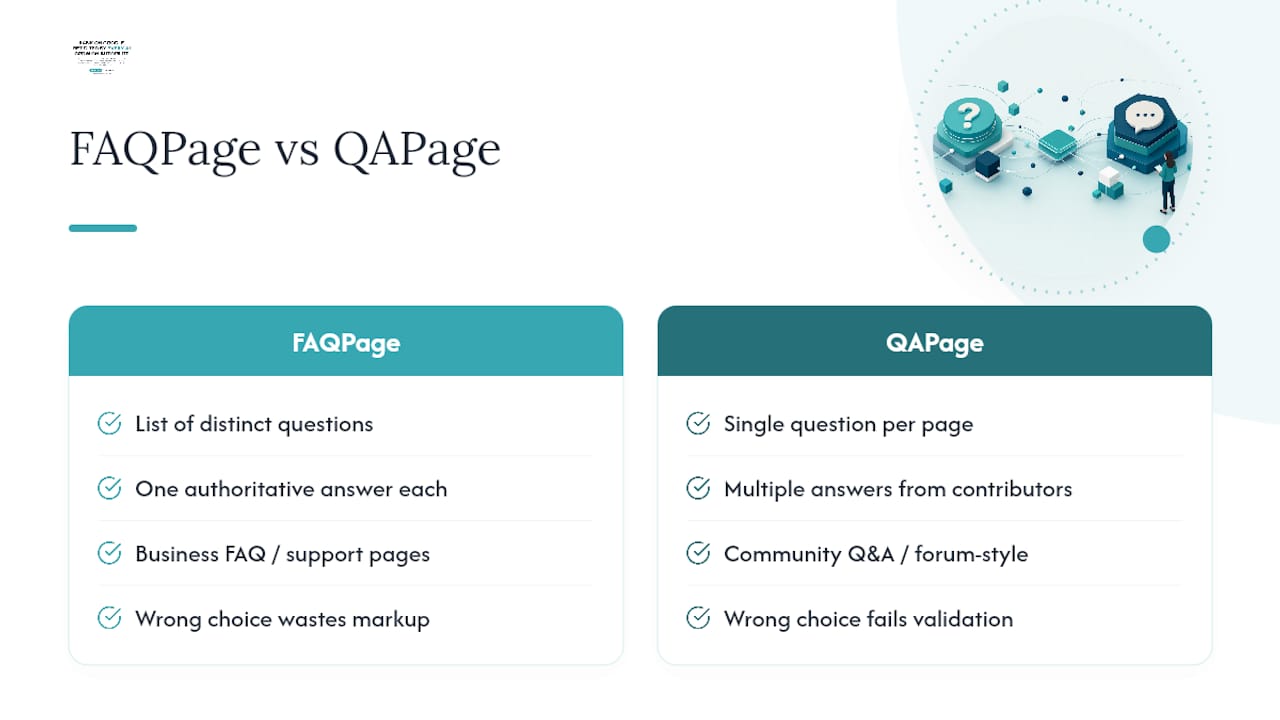
These two schema types get confused constantly, and picking the wrong one wastes the markup entirely. FAQPage is for a list of distinct questions with their own answers, like a support page or product FAQ section. QAPage is built for forum-style content where a single question receives multiple answers from different users, the way Google’s own QAPage documentation describes community Q&A formats.
If your page has one question with several competing answers from different contributors, use QAPage. If your page has several distinct questions each with one authoritative answer, which describes the vast majority of business FAQ sections, use FAQPage. Mixing the two up doesn’t just fail validation. It signals the wrong content structure to any crawler trying to understand what your page actually is.
How Stellor Handles FAQ Schema at Scale
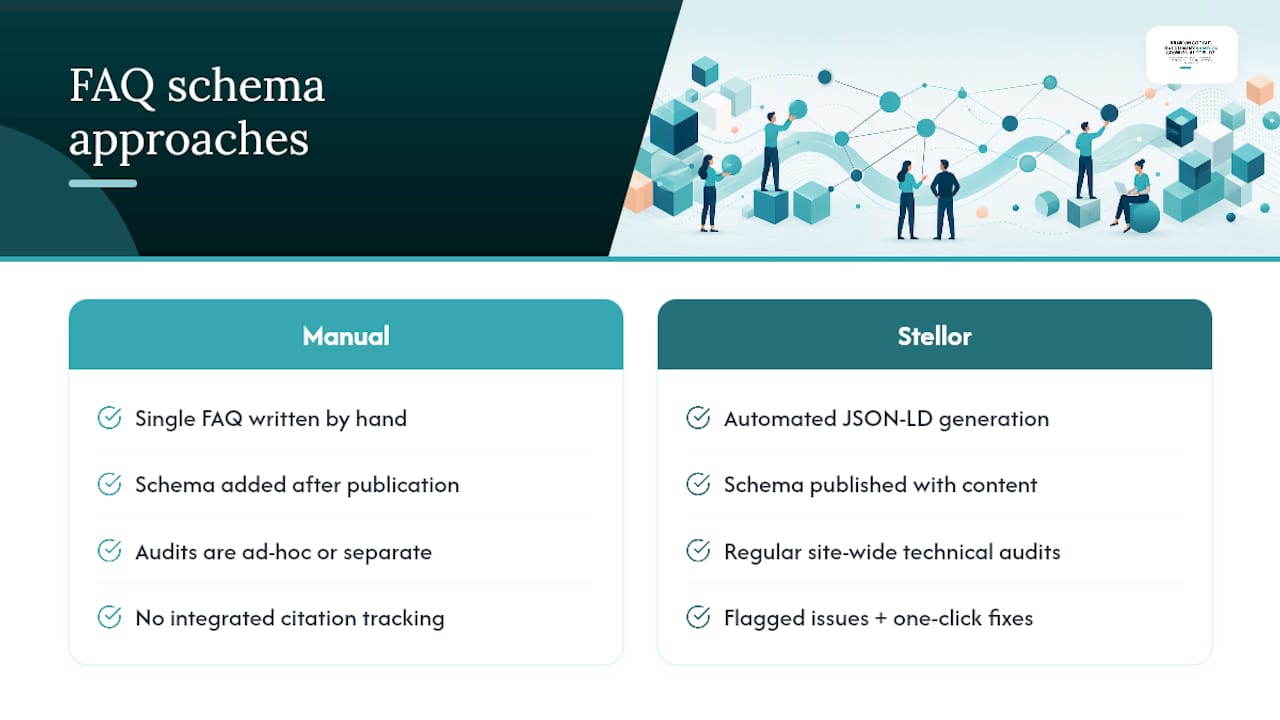
Writing one FAQ block by hand is manageable. Writing correct, validated FAQ schema across dozens of service pages, location pages, and comparison guides every month is a different problem entirely, and it’s the kind of repetitive technical work that breaks down fast without a system behind it.
The platform publishes multiple GEO and SEO-optimized articles monthly for each customer, generating schema-aware JSON-LD blocks automatically as part of the production process, rather than adding them afterward. That matters because manually retrofitting schema onto content after publication is where most teams introduce the mismatches between visible and structured content described earlier.
Regular technical audits check schema completeness and structured data integrity across the site, not just newly published pages, and flagged issues come with one-click fixes. Additionally, the platform tracks AI citation signals across several AI engines alongside standard Google indexing data, allowing users to assess whether schema changes impacted visibility in search results.
For teams managing FAQ content across multiple service categories, that combination of automated generation, audit coverage, and citation tracking replaces a stack of separate tools most agencies would otherwise need to run in parallel.
When Should You DIY FAQ Schema vs. Use a Managed Platform?
FAQ schema itself isn’t hard to implement once. Copy a JSON-LD block, match it to your visible content, validate it, deploy it. Any developer comfortable with JSON can do this for five or ten pages in an afternoon.
The calculation changes once you’re maintaining FAQ schema across dozens or hundreds of pages, especially when pricing, service areas, or product details update regularly. At that point, the bottleneck isn’t writing the markup. It’s the ongoing QA burden of catching every place visible content drifted from its structured data twin, plus tracking whether your rich results are still eligible after Google’s periodic display changes.
The signals worth watching: if you’re publishing new pages every week, if nobody on your team owns structured data QA as a recurring task, or if you care about tracking AI citation alongside traditional rankings, that’s usually the point where a managed platform earns its cost back in saved hours. Below that threshold, a solid internal checklist and a recurring calendar reminder will carry you fine.
— Cole
A Managed Path for Teams That Want Schema Handled Automatically
Stellor is the alternative to hiring a developer and an SEO agency separately to keep FAQ schema accurate across a growing site. Instead of paying for content production, technical audits, and structured data QA as three separate line items, Stellor bundles all of it, plus backlink building and AI visibility tracking, into one $199-per-month subscription.

This subscription replaces multiple separate services including content writing, technical SEO audits, link-building, schema management, and AI visibility tracking. Every new page published includes schema-aware structured data from the start, and regular audits catch drift before it affects rich-result eligibility. Users also gain visibility into whether major AI platforms are citing their pages, a feature uncommon among schema-focused tools.
If you want to see what that looks like on your own site, Stellor’s product page walks through the full feature set, and you can start a 3-day free trial with no credit card required.
Sources
Bookmark these three references as your canonical set for anything FAQ schema related:
FAQ
Does FAQ schema still work?
Yes, FAQPage markup is still fully valid schema.org vocabulary, and Google still reads and processes it. What has changed over time is how consistently Google displays the visual rich result in search, which depends on the query and site rather than the validity of your markup.
What is FAQ schema and how does it work?
FAQ schema is a JSON-LD structure based on schema.org’s FAQPage type that lists questions and answers in a machine-readable format. Each question sits inside a mainEntity array with a name field and an acceptedAnswer containing the answer text, and that text must match what’s visible on the page.
How do I make FAQ schema?
Write your visible FAQ content first, then wrap each question and answer into a Question and acceptedAnswer object inside a single FAQPage block. Validate the block with validator.schema.org, then confirm it renders correctly using Search Console’s URL Inspection tool before considering it live.
How should I structure a FAQ page?
Keep it to 3 to 10 real questions pulled from actual customer questions, not keyword research alone. Group questions by intent, for example billing questions together and setup questions together, and keep each answer to two or three concise sentences that match your JSON-LD exactly.
Can I use FAQ schema on product and service pages?
Yes. Product pages work well with sizing, warranty, and compatibility questions, while service pages perform better with pricing, scheduling, and process questions. The same 3 to 10 question guideline applies regardless of page type.
Does Stellor include FAQ schema in its content?
Stellor generates schema-aware JSON-LD as part of its 30 monthly articles and runs weekly audits that check structured data integrity across the full site. For the latest pricing and plan details, visit Stellor’s product page.