

Usually no. Crawl budget rarely limits a small local site with a few dozen pages. It becomes a real problem when you bulk-publish thin location pages, generate parameter-heavy URL variants, or notice indexing delays that stretch past two weeks. If that sounds like your site, treat it as a priority this week, not next quarter.
Run these three checks in the next hour:
- Filter Search Console’s Index Coverage report by a location-only sitemap to see your indexed share.
- Open Crawl Stats and check average response time. Anything consistently above 500ms drags down crawl capacity, per Google’s crawl budget documentation.
- Pull a sample of server logs and confirm how often Googlebot actually visits your service and location pages versus how often it hits junk parameter URLs.
Pro Tip: Don’t start with robots.txt tweaks. Start with Search Console. You need to know whether you have a crawl problem or an indexing-quality problem before you touch a single directive.
TL;DR:
- Most small local sites do not face crawl budget limitations unless they publish大量 thin location pages or generate numerous parameter-heavy URLs.
- Checking Search Console’s Crawl Stats and Index Coverage reports, along with server logs, helps identify whether crawl capacity or demand issues cause indexing delays.
- Pruning thin, duplicate location pages and adding unique local details can significantly improve indexed share and alleviate crawl demand problems.
- Upgrading server capacity by caching, using CDNs, and fixing server errors can increase crawl capacity, but content quality remains the key factor.
- Monitoring crawl metrics weekly and pruning in small batches helps sustain a healthy indexed share without confusing results.
Table of Contents
- Why Crawl Budget Matters for Local SEO
- How to Diagnose Crawl Budget Problems
- Prioritize and Prune Your Location Pages
- Technical Fixes That Improve Crawl Capacity
- What to Monitor and How Often
- How Stellor Handles Crawl Budget Monitoring
- Key Takeaways
- Primary Sources and Practical Reads
- What Actually Moves the Needle on Crawl Budget
- Sources
- FAQ
Why Crawl Budget Matters for Local SEO
Google allocates crawl budget based on two factors: crawl capacity (how much your server can handle) and crawl demand (how much Google wants to crawl based on popularity, freshness, and perceived inventory). Local sites run into trouble on the demand side. When you publish 200 near-identical “[Service] in [City]” pages with 150 words of swapped text, Google reads that as low-value inventory and stops bothering to recrawl it.
The real damage isn’t that Google refuses to crawl your site. It’s that a growing share of your location pages sit in “Discovered — currently not indexed,” meaning Google found them and decided they weren’t worth the trip.
Watch for these local-site failure patterns:
- Bulk-published location stubs with duplicate boilerplate and one swapped city name
- Faceted navigation or filter combinations generating thousands of near-duplicate parameter URLs
- A high percentage of URLs stuck in “Discovered — currently not indexed” in Index Coverage
Pruning beats robots tricks here. Local sites most often trigger crawl issues by bulk-publishing near-duplicate location pages, and the fix is fewer, stronger pages, not cleverer blocking rules.
How to Diagnose Crawl Budget Problems
Start with Search Console, then confirm with logs. Here’s the sequence:
- Open Crawl Stats and note average pages crawled per day and average response time.
- Open Index Coverage and separate “Crawled — currently not indexed” from “Discovered — currently not indexed.” These are different problems with different fixes.
- Pull a week of server logs and filter for the Googlebot user agent to see which URL patterns get crawled most.
- Check for 5xx spikes and unusual traffic from non-Google bots that could be eating server capacity.
- Compare publish date to index date on ten recent pages to measure your actual indexing lag.
Search Console’s Crawl Stats report separates these signals clearly, and logs tell you what actually happened rather than what Google’s dashboard summarizes.
| Signal | Normal range | Cause for concern |
|---|---|---|
| Indexing lag | 3–14 days | Consistently over 14 days |
| Avg. server response time | Under 500ms | Rising trend or repeated spikes |
| “Discovered — not indexed” share | Small, stable | Growing month over month |
| 5xx error rate in logs | Near zero | Recurring spikes tied to traffic |
Prioritize and Prune Your Location Pages
Once you’ve confirmed a real problem, fix content before touching robots.txt. Here’s the order of operations:
- Delete or merge any page too thin to justify a separate URL. If it has some backlinks or traffic, 301 redirect it to a stronger, related page instead of a flat 404.
- Strengthen pages with real signal: unique local details, photos, staff quotes, service specifics that don’t exist on the sibling pages.
- Segment your sitemap. Create a dedicated location-pages sitemap and track “indexed pages divided by submitted pages” as your core progress metric. This single number tells you if pruning is working.
- Add internal links deliberately. Point 2 to 3 links from your homepage or top service pages to each location page you actually want indexed. A guide on internal linking for service and location pages walks through the structure in more detail.
Don’t link to thin pages just to bump their crawl frequency. Google will crawl them, find nothing new, and lower demand for that page class anyway. If you’re managing more than a handful of locations, a multi-location SEO strategy built around fewer, stronger pages outperforms a large catalog of duplicates almost every time.
Pro Tip: Prune in batches of 10 to 20 pages, then wait two to three weeks before pruning more. This gives you a clean before-and-after read on indexed share instead of a muddled result from changing everything at once.
Technical Fixes That Improve Crawl Capacity

Content pruning fixes demand. These fixes raise capacity and cut waste.
Capacity upgrades:
- Serve cached static HTML to Googlebot instead of rendering every request dynamically.
- Add a CDN if your origin server struggles under load, especially during traffic spikes.
- Fix 5xx errors immediately. Google’s own documentation confirms that server errors reduce crawl capacity, sometimes within days of the errors starting.
- Collapse redirect chains. Two or three hops per URL wastes crawl requests that could go to new content.
Inventory controls:
- Use robots.txt to block genuinely low-value paths like internal search results or filtered archives, not pages you actually want indexed.
- Set canonical tags on parameter variants so Google consolidates signals to one URL.
- Reserve noindex for controlled remediation. It still requires a crawl to register, so it’s not a fast fix, per Townsmith’s guidance on local crawl budget.
AI crawler management: Check your logs for GPTBot, ClaudeBot, and PerplexityBot activity. Blocking heavy non-Google crawlers is a legitimate move when they measurably slow down TTFB and eat into the capacity Googlebot would otherwise get.
| Lever | Effect | Effort |
|---|---|---|
| Static caching | Raises crawl capacity | Low |
| Fixing 5xx errors | Raises crawl capacity | Medium |
| Canonical tags on parameters | Cleans inventory | Low |
| Throttling AI bots | Frees server capacity | Low |
For a deeper look at server-side fixes, see this site speed optimization guide.
What to Monitor and How Often
Set a simple cadence so you catch regressions before they compound.
Track these metrics:
- Indexed share per sitemap, especially your location sitemap
- Average pages crawled per day and how it trends after changes
- TTFB, both from Search Console and a synthetic checker
- Growth or shrinkage in “Discovered — currently not indexed” counts
Use these tools:
- Google Search Console for Crawl Stats and Index Coverage
- Server log analysis via Screaming Frog Log File Analyzer or a Logstash/Kibana setup
- CDN dashboards for real-time TTFB and bot traffic
Check crawl stats weekly. Review sitemap indexed share monthly. Run pruning as a controlled experiment: small batch, measure the result, then scale what worked. An SEO audit checklist for local service businesses can help you standardize this review each month.
How Stellor Handles Crawl Budget Monitoring

Most of this work is manual unless it’s built into your stack. Stellor runs weekly technical audits covering 11 checks, including TTFB alerts and indexing signals, so crawl problems surface before they cost you rankings.
The platform also handles the content side directly:
- Sitemap segmentation by page type, so you can watch indexed share for location pages specifically
- Automated publishing of 30 GEO and SEO-optimized articles a month, replacing thin stubs with pages built to be indexed and cited
- An 4,000-site backlink network that builds the demand signal Google weighs alongside freshness and popularity
- AI visibility tracking across ChatGPT, Claude, Perplexity, and Gemini, so you know if you’re getting cited, not just crawled
Pro Tip: Ask any platform you’re evaluating whether it reports indexed share by sitemap segment. If it only reports total traffic or rankings, you’re flying blind on the exact metric that tells you whether pruning worked.
Setup takes about 15 minutes and produces a free AI Visibility Audit within 48 hours, including a technical site report you keep even if you cancel. Check the Stellor product page for the full breakdown, and start with the 3-day free trial, no card required.
Key Takeaways
Crawl budget problems in local SEO almost always stem from thin, duplicate location pages, and pruning them raises indexed share faster than any robots.txt change.
| Point | Details |
|---|---|
| Most sites are fine | Crawl budget rarely limits small local sites; it matters when you bulk-publish thin or parameter-heavy pages. |
| Diagnose before acting | Use Search Console’s Crawl Stats and Index Coverage, then confirm with server logs. |
| Prune first | Merge or delete thin location pages and redirect any with existing value to a stronger page. |
| Segment your sitemap | Track indexed pages divided by submitted pages for your location sitemap as your core metric. |
| Fix capacity second | Caching, CDN use, and fixing 5xx errors raise how much Google is willing to crawl. |
Primary Sources and Practical Reads
Start with the source documentation, then move to applied examples:
- Google’s official crawl budget documentation explains the capacity and demand model directly from the source.
- Backlinko’s crawl budget breakdown covers practical fixes like redirect chains and parameter handling.
- Google Search Console Help on Crawl Stats documents exactly how to read the report.
- For sitemap mechanics specifically, SprayfoamRemoval’s sitemap documentation is a useful practical reference on structuring sitemaps for discovery.
What Actually Moves the Needle on Crawl Budget
Most crawl budget advice treats it as a technical problem to solve with directives: robots.txt rules, crawl-delay settings, clever canonical chains. That’s backward for local sites. The technical layer matters, but it’s cleanup work that follows a content decision, not a substitute for one.
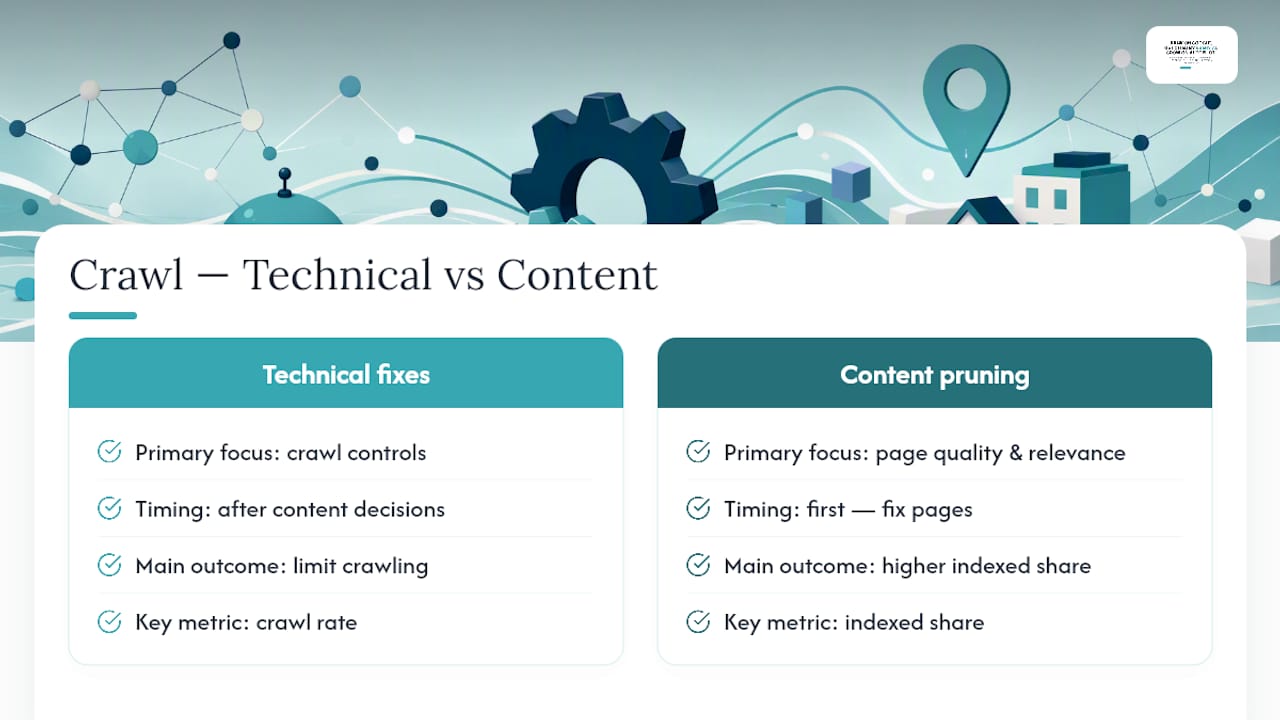
The conventional advice undersells how much of this is a content quality problem wearing a technical costume. A site with 300 thin location pages doesn’t have a crawl budget problem. It has a “we published pages nobody asked for” problem, and Google’s crawlers are just the messenger. Fix the pages first. The crawl signals follow.
If you take one thing from this, prioritize indexed share over crawl rate. A site that gets crawled less but indexes a higher percentage of what it submits is healthier than one crawled constantly while most pages sit ignored. Bidwolf’s research on local lead generation makes a similar point from the business side: visibility problems usually trace back to page quality, not just technical plumbing.
— Cole
Sources
- Crawl Budget Management | Google Crawling Infrastructure
- What is Crawl Budget and Why Does It Matter for SEO? - Backlinko
FAQ
What Is a Crawl Budget in SEO?
Crawl budget is the number of pages Googlebot is willing and able to crawl on your site within a given timeframe, determined by crawl capacity (server responsiveness) and crawl demand (freshness, popularity, and perceived inventory quality).
What Is Crawl in SEO?
Crawling is the process where search engine bots like Googlebot discover and download web pages by following links and sitemaps, which happens before a page can be indexed or ranked.
Can You Give Me an Example of Local SEO?
A plumbing company creating a dedicated page for “emergency plumber in Denver” with unique local details, service area specifics, and customer reviews, rather than a templated stub swapped across many cities, is a working example of local SEO done well.
What Will Local SEO Look Like in 2026?
Local SEO in 2026 increasingly depends on both traditional Google rankings and being cited correctly by AI answer engines like ChatGPT, Perplexity, and Gemini, which pulls from the same indexed, high-quality pages that satisfy crawl budget best practices.
How Long Should Indexing Take for a New Page?
Normal indexing lag runs 3 to 14 days for a healthy site; if pages consistently take longer than 14 days to index, it’s worth investigating crawl capacity or content quality issues.